No products in the cart.

-27%


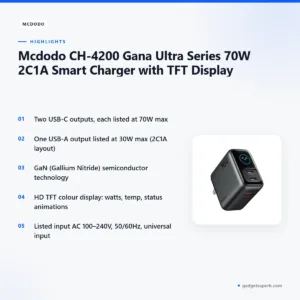
The Mcdodo CH-4200 is a 70W multi-port charger with two USB-C outputs, one USB-A output and a TFT display, according to the listing. It suits Bangladeshi buyers who want to charge a laptop, a phone and other devices from one socket at home, at the office or on the move.
- Overview
- Key features
- Specifications
- How to use / set up
- Compatibility and what is in the box
- Who should buy it in Bangladesh
- Alternatives in our store
- Warranty and support
- Delivery, returns and ordering
- Frequently asked questions
Mcdodo CH-4200 overview: who it is for
The Mcdodo CH-4200 belongs to the Gana Ultra Series. The listing gives the full product name as Mcdodo CH-4200 Gana Ultra Series 70W 2C1A Smart Charger with TFT Display, and it describes the build as GaN (Gallium Nitride) semiconductor technology. The listing also describes two USB-C outputs and one USB-A output, which it calls 2C1A. Those are the details the maker lists, and they are the ones this page quotes.
The main question for most buyers is how many devices need power at the same time. The listing describes two USB-C outputs and one USB-A output, so one Mcdodo CH-4200 can serve more than one device instead of several separate chargers, within the output combinations shown later on this page. The listing names MacBook Pro and MacBook Air, Dell XPS, HP Spectre, Lenovo ThinkPad and Yoga, and Asus ZenBook among its laptop examples. That makes the Mcdodo CH-4200 a sensible option for people who work on a laptop and also charge a phone at the same desk.
The listed input is universal, AC 100–240V, so check that range against your own supply. For general background on the category, read the overview of battery chargers on Wikipedia. Then compare the listed figures with the devices you own. Confirm your model before you order, especially for laptops, because the listing names laptop families rather than every model. The Mcdodo CH-4200 is listed with 70W on each USB-C port, but the listing gives lower combined figures when two or more ports run together, as the combinations table shows.
Key features
Two USB-C outputs rated up to 70W
The listing shows two USB-C outputs, named USB-C1 and USB-C2. Each one is listed with the same output steps: 5V/3A, 9V/3A, 12V/3A, 15V/3A and 20V/3.5A, with 70W maximum. These two ports are the ones to use for a laptop or another device that needs more power, because the USB-A output is listed at a lower maximum of 30W. Before you connect anything, check the charging requirement of your device, and use a cable that suits the port it needs. Keep the cable free of sharp bends where it leaves the plug, and avoid tugging the cable to move the charger.
GaN (Gallium Nitride) technology and listed material
The listing names the technology as GaN (Gallium Nitride) semiconductor, which is the technology the maker gives for the Gana Ultra Series build of the Mcdodo CH-4200. The listing also gives the material as Fire-Resistant PC (Polycarbonate). These are the listed details, and we present them as the maker states them, without adding any extra claim. Read them alongside the specifications table if you want to weigh the Mcdodo CH-4200 against other chargers you are considering. Take the wording from the listing at face value and compare it with your own needs.
HD TFT colour display
The listing describes an HD TFT Color Display and lists its function as showing watts, temperature and status animations. Those are the only display details the listing gives, so this page does not describe the screens or their layout. The display is part of the product name, which is why the charger is sold as the Mcdodo CH-4200 with TFT Display. If you want more detail on the display, message us on Facebook Messenger, call us or email us, and we will answer from the information we hold. We will not guess at details that are not in the listing.
Multi-port output combinations
The listing gives four combinations when ports run together. USB-C1 with USB-C2 is listed as 45W + 20W (65W Max). USB-C1 with USB-A is listed as 45W + 18W (63W Max). USB-C2 with USB-A is listed as 5V/3A (15W Max Combined). The fourth is USB-C1 with USB-C2 and USB-A together, listed as 45W + 15W (60W Max). These figures show that the total output depends on which ports are in use. Work out which device needs the most power before you choose a port, so you plan your charging before you connect several devices to the Mcdodo CH-4200.
Universal input, dimensions and weight
The listed input is AC 100–240V ~ 50/60Hz, 1.2A Max, described as universal input. The listed dimensions are 57 × 33.8 × 94.6 mm, and the listed weight is approximately 129.6g. The colour is listed as black. These are the figures to check if you plan to keep the Mcdodo CH-4200 on a desk, in a bag or near a socket with limited space. Mounting options and cable length are not part of the listed details, so ask us if either matters to your set-up. Measure the space behind your desk before you buy, so the plug and cable have room.
Specifications
Specifications for the Mcdodo CH-4200 are arranged below as label and value rows, copied from the listing.
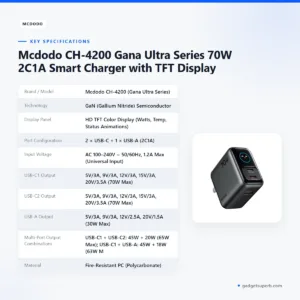
| Brand / Model | Mcdodo CH-4200 (Gana Ultra Series) |
| Technology | GaN (Gallium Nitride) Semiconductor |
| Display Panel | HD TFT Color Display (Watts, Temp, Status Animations) |
| Port Configuration | 2 × USB-C + 1 × USB-A (2C1A) |
| Input Voltage | AC 100–240V ~ 50/60Hz, 1.2A Max (Universal Input) |
| USB-C1 Output | 5V/3A, 9V/3A, 12V/3A, 15V/3A, 20V/3.5A (70W Max) |
| USB-C2 Output | 5V/3A, 9V/3A, 12V/3A, 15V/3A, 20V/3.5A (70W Max) |
| USB-A Output | 5V/3A, 9V/3A, 12V/2.5A, 20V/1.5A (30W Max) |
| Multi-Port Output Combinations | USB-C1 + USB-C2: 45W + 20W (65W Max); USB-C1 + USB-A: 45W + 18W (63W Max); USB-C2 + USB-A: 5V/3A (15W Max Combined); USB-C1 + (USB-C2 + USB-A): 45W + 15W (60W Max) |
| Material | Fire-Resistant PC (Polycarbonate) |
| Dimensions | 57 × 33.8 × 94.6 mm |
| Weight | Approx. 129.6g |
| Color | Black |
These are listed specifications from the product listing for the Mcdodo CH-4200.
How to use / set up
Start by checking the wall socket. The listed input is AC 100–240V ~ 50/60Hz, so confirm that your supply sits within that range before you plug in the Mcdodo CH-4200. If your socket or plug does not suit the adapter, do not force it. Ask us for advice on suitable options before you use it with a new socket, and keep the plug and socket dry while you connect.
Where the maker’s instructions recommend it, charge fully before first use. Follow the maker’s instructions for the Mcdodo CH-4200 for the first connection and for any device-specific steps. Keep the charger in a dry, ventilated place while you set it up, because humidity in Bangladesh can be high during the monsoon months and damp air is hard on any electrical item.
Connect the device you want to charge using a cable that suits its port. The listing does not confirm which cables are supplied, so bring the cable you need. Place the charger on a flat surface rather than under bedding or loose papers, which keeps air moving around the housing. When you have more than one device connected, read the multi-port combinations table so you know what the charger can deliver on each port.
Store the charger away from direct heat and damp areas when it is not in use, and keep the cable loosely coiled rather than tightly wound. Wipe the outside with a dry cloth. If the housing or cable of the Mcdodo CH-4200 looks damaged, stop using it and ask us for advice before you connect anything else.
When you are not charging, unplug the adapter from the wall rather than leaving it switched on at the socket with nothing attached. Check the plug pins from time to time for dust, and wipe them with a dry cloth. Do not use a damp cloth or spray cleaner near the sockets. These are general habits for any mains charger, and they help keep the set-up tidy during the humid months.
For a shared desk, label each cable so you can see which device goes into which port. Set up the same way each time, so the arrangement stays predictable when you are charging several items in the evening.
Plan a simple routine for evening charging in a Dhaka home. Plug in the devices with the highest demand first, check that the cables are seated, and leave the charger in view so you notice anything unusual early. Unplug the adapter when every device is full, unless you need it for the next morning. This habit is good practice for any multi-port charger.
During load-shedding, keep your devices charged before the power goes off. Check the plug and socket once the supply returns before you reconnect, and keep the adapter on a stable surface rather than on the floor. Some households use a surge protector for the whole desk, and you may want one too. Ask us about options if you are unsure which one suits your set-up.
Compatibility and what is in the box
The listing names the following laptop families as compatible: MacBook Pro and MacBook Air, Dell XPS, HP Spectre, Lenovo ThinkPad and Yoga, Asus ZenBook, and other USB-C PD laptops. The Mcdodo CH-4200 is listed as compatible with those families, not as a guarantee for every laptop model in use. Check your laptop’s charging requirement and the cable you plan to use, and keep the listed names in mind when you compare models.
The listing also names smartphones: Apple iPhone (16, 15, 14 and 13 series), Samsung Galaxy S24 and S23 Ultra with SFC 2.0 supported, Google Pixel, Xiaomi, OnePlus and Huawei. Tablets and others include iPad Pro, Air and Mini, Nintendo Switch, Steam Deck, wireless earbuds, smartwatches and power banks. The Mcdodo CH-4200 is listed for these devices by the maker, and these names form the basis of the compatibility notes on this page.
What is in the box is not stated in the listing. We cannot confirm which cables, plugs or accessories come with the unit, so do not assume a specific cable is supplied. If you need a particular cable, ask us about it before you order. The listing also does not confirm how every device behaves with the Mcdodo CH-4200, and results may depend on your device, your cable and the power setting it requests.
Cable choice matters more than many buyers expect. Match the connector on the cable to the port on the charger and to the port on your device, and make sure the cable suits the power your device requests. If you already own a cable you trust, check its condition first. Replace any cable with a damaged sheath or a loose connector before you connect it to the Mcdodo CH-4200.
Who should buy it in Bangladesh
A home office user who works on a laptop and charges a phone at the same desk is the clearest fit. The Mcdodo CH-4200 gives two USB-C outputs for a laptop and a phone, plus a USB-A output for a third device, which can reduce the number of adapters on the desk. Keep the multi-port combinations in mind when two high-demand devices are connected at once.
A student or freelancer who moves between a laptop, a phone and wireless earbuds can use one Mcdodo CH-4200 at a family desk or in a shared room. The listing names wireless earbuds and smartwatches as compatible devices, so one adapter can serve more than one item on that list. Pack the cable you need, because the listing does not confirm what is supplied.
A family with several phones and a tablet may find the USB-A output useful for an extra device, though it is listed at 30W maximum, so plan which device goes on which port. The listing names iPad Pro, Air and Mini and Samsung Galaxy phones among supported devices. The Mcdodo CH-4200 suits a family that wants one charger for the main room rather than several separate units.
Commuters who carry a laptop, a phone and a power bank can use the charger at home or at work, and charge the rest of their kit from the same socket. The listing names power banks in its compatibility list, which is useful if you already carry one. Check the input range against your supply before you rely on it in a new location, such as a rented flat or a relative’s home.
A gamer or handheld fan who owns a Nintendo Switch or a Steam Deck can add either device to the same desk setup, because the listing names both among tablets and other compatible devices. Think about how often you play while the laptop is also charging, and whether two high-demand items on one charger suit your routine. The multi-port table is the place to check that.
A household that worries about load-shedding may want to keep a charged power bank as well as the Mcdodo CH-4200, so that essential phones can still be charged during an outage. The listing names power banks among compatible devices. Plan your charging around the times your supply is most reliable.
A buyer who wants only one phone charger at a bedside may find the Mcdodo CH-4200 more than they need. In that case a simpler charger with fewer outputs may suit better. Think about the devices you charge every day, then choose the level of output that matches them rather than the largest number of ports.
Another fit is a buyer who wants to replace several mismatched adapters with one unit that has two USB-C outputs and one USB-A output. Gather your old chargers, check which device each one serves, and see how many of those jobs the charger can cover. Count the devices, not the plugs, because the listing gives the output per port rather than per device.
If you are new to multi-port chargers, start with the device you charge most often and build outwards from there. Write down which devices charge together on a normal evening, and check that list against the combinations table before you decide. This simple habit prevents most surprises when you first set up a shared charger.
Alternatives in our store
Ask three questions before you choose: how many devices will charge at the same time, which ports those devices need, and where the charger will live. The Mcdodo CH-4200 suits a desk with several devices, while the alternatives below suit other routines.
If you are comparing options, look at LDNIO SC10610 30W 6-Port USB Charger Power Strip, which is another charger power strip in our range. For a different multi-port charger, see JR-TCM02 65W Multi-Port Charger.
If you prefer a wireless option, Anker 623 MagGo Magnetic Wireless Charger is a wireless charger in our range. For travel, Momax 1-World+ 70W GaN 3 Port + AC Travel Adapter with USB-C Cable is a travel adapter in our range. If the Mcdodo CH-4200 does not suit you, browse the full Chargers & Adapters category.
Warranty and support
Warranty: 18 Months seller warranty.
Delivery, returns and ordering
We deliver all over Bangladesh and you pay cash on delivery. Delivery usually takes 1–3 days inside Dhaka city and 2–5 days outside Dhaka, so plan your timing around when you need the Mcdodo CH-4200 at home or at the office.
You can return it within 7 days of delivery (see our Delivery and Returns policy). The policy applies to every order, including this charger, so read it before you place your order.
Questions before ordering: call 09638054751, message us on Facebook Messenger or email care@gadgetsuperb.com. Ask us about the Mcdodo CH-4200 if you have questions about compatibility or the cable you need.
Ordering is straightforward. Decide which device you need to charge, check the compatibility notes above, and then contact us with your question. Ask about delivery to your area before you order, so you know the expected window.
If you live outside Dhaka, allow the longer window of 2–5 days, and keep a phone number that the courier can reach. For urgent needs inside Dhaka city, the 1–3 day window is the one to plan around. Message us on Facebook Messenger or call us if you want to confirm the timing for your address before you order.
Frequently asked questions
Is the Mcdodo CH-4200 a 70W charger?
Yes. The listing names it as a 70W charger, with 70W maximum on each USB-C output and 30W maximum on the USB-A output.
Can the Mcdodo CH-4200 charge a laptop?
According to the listing, it works with MacBook Pro and MacBook Air, Dell XPS, HP Spectre, Lenovo ThinkPad and Yoga, Asus ZenBook and other USB-C PD laptops.
Does the Mcdodo CH-4200 work with iPhone?
The listing names Apple iPhone 16, 15, 14 and 13 series as supported smartphones.
What input voltage does the Mcdodo CH-4200 need?
The listed input is AC 100–240V ~ 50/60Hz, 1.2A Max, described as universal input.
Does the Mcdodo CH-4200 carry a warranty?
Warranty: 18 Months seller warranty.
Does the listing say what is in the box?
No. The listing does not state the contents, so ask us if you need a specific cable.
Can I return the charger?
Yes, you can return it within 7 days of delivery. See our Delivery and Returns policy for the full terms.
How do I pay and how long does delivery take?
You pay cash on delivery. Delivery usually takes 1–3 days inside Dhaka city and 2–5 days outside Dhaka.
Is the Mcdodo CH-4200 compatible with Samsung Galaxy phones?
The listing names Samsung Galaxy S24 and S23 Ultra as compatible, with SFC 2.0 supported.
Can the Mcdodo CH-4200 charge a Nintendo Switch or Steam Deck?
The listing names Nintendo Switch and Steam Deck among tablets and other compatible devices.
Related products
-20%
100 in stock
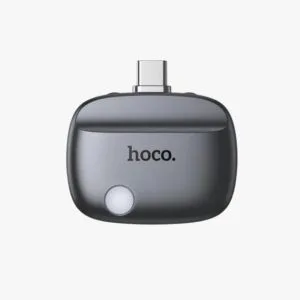
Hoco DI109 Smart Fully Charged Disconnector with Auto Cutoff
Original price was: ৳ 1,140.৳ 910Current price is: ৳ 910.-20%
50 in stock
Anker Zolo 30W IQ & PD Type-C Charger Adapter Black
Original price was: ৳ 1,150.৳ 920Current price is: ৳ 920.-23%
50 in stock
Anker PowerPort 20W USB-C Adapter with USB-C to Lightning Cable
Original price was: ৳ 2,540.৳ 1,950Current price is: ৳ 1,950.-26%
44 in stock
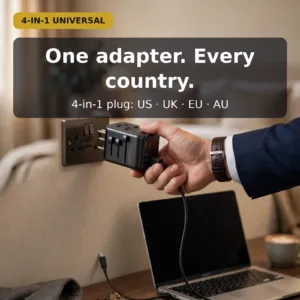

Awei C-39 35W GaN Universal Travel Adapter – 5-Port Multi-Function Fast Charger,International Plug for EU/UK/US/AU
Original price was: ৳ 2,870.৳ 2,120Current price is: ৳ 2,120.-20%
50 in stock
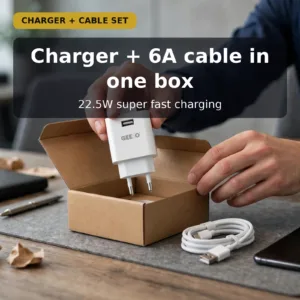
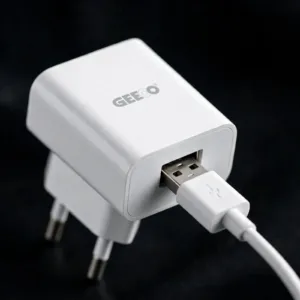
GEEOO C22 22.5W Super Fast Type-C Charger Set with 6A Fast Charging Cable
Original price was: ৳ 580.৳ 460Current price is: ৳ 460.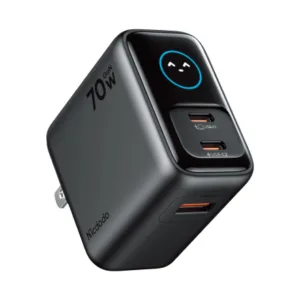 Mcdodo CH-4200 Gana Ultra Seri...
Original price was: ৳ 4,810.৳ 3,510Current price is: ৳ 3,510.
60 in stock
Reviews
There are no reviews yet.