No products in the cart.

-20%


The aula ak105 keyboard is a full-size, USB wired membrane keyboard with 104 standard keys, including a number pad, and the maker lists it as a black office keyboard. It suits Bangladeshi offices, schools, shops and home desks where people want a plain keyboard for daily typing.
- Overview of the aula ak105 keyboard
- Key features
- Specifications
- How to use and set up
- Compatibility and what is in the box
- Who should buy it in Bangladesh
- Alternatives in our store
- Warranty and support
- Delivery, returns and ordering
- Frequently asked questions
Overview of the aula ak105 keyboard
The listing presents the aula ak105 keyboard as a full-size USB wired model in black, with 104 standard keys and a number pad. The maker describes the design as compact and minimalist, and says it fits any setup. For an office in Dhaka, a school desk or a home study where people type documents, emails and figures through the day, this keyboard is a simple place to start.
The listing describes the switches as membrane, which it says give quiet, smooth typing, and the body as durable ABS plastic for everyday use. It also lists key durability as up to ~10 million presses. You can use the aula ak105 keyboard as your main typing keyboard or as a spare for a second computer at home.
The listing gives an operating voltage of DC 5V and a current draw of ≤100 mA, and it describes the model as plug-and-play. Treat these as the maker’s published figures. Many desks in Bangladesh are shared between study and work, so a keyboard that needs no driver installation is easy to move between machines, and it keeps the set-up on a crowded desk straightforward.
Key features
Six points from the product listing are covered below. Each one uses the listing wording and explains how it may matter for daily work in Bangladesh, so you can judge whether the aula ak105 keyboard suits your desk and your routine.
Full-size 104-key layout
The listing describes the aula ak105 keyboard as a full-size model with 104 standard keys, including a number pad. That is the layout most people picture when they think of a complete office keyboard, and it keeps every standard key on one unit.
A full-size board keeps the number pad beside the letter keys, so you do not need a separate numeric accessory on your desk. People who enter invoices, stock lists, exam marks or bank figures often choose this layout first. If you mainly type text, the same 104 standard keys still give you a complete set for writing, editing and searching.
USB wired connection
The listing describes a USB wired interface for reliable, instant connection. The aula ak105 keyboard connects through its attached USB cable, so there is no separate receiver to keep track of on a crowded desk.
Plug the cable into a free USB port on your computer and the keyboard is ready for use. In a Dhaka office, where desks often hold a computer, a printer, a router and a phone charger, a wired link means one fewer item to manage. Keep the cable clear of chairs and foot traffic so it is not pulled loose during a busy day.
Membrane key switches
The listing names membrane key switches for the aula ak105 keyboard and says they give quiet, smooth typing. Quiet typing can suit shared offices, classrooms and family homes where people work close together.
When you first set up the keyboard, type a few lines of text to see how the keys feel to you. Every typist has a preferred feel, so a short test on your own machine is the best guide. For general background on how keyboards are built, read the general article on computer keyboards.
Durable ABS construction
The listing gives the material as ABS plastic and describes the construction as durable for everyday use. It also lists key durability as up to ~10 million presses for the aula ak105 keyboard.
These are the maker’s figures, so read them as what the listing says rather than as a promise about any single unit. In Bangladesh’s humid months, keep the keyboard on a dry desk and store it somewhere dry when it is not in use. Wipe the surface with a soft, dry cloth after use, and keep food and drink away from the keys.
Compact, minimalist black design
The listing describes the aula ak105 keyboard as having a compact, minimalist black design that fits any setup. The listed colour is black, the listed dimensions are approximately 447 × 137.6 × 26 mm, and the listed weight is approximately 385 g.
If your desk space is tight, measure the spot where the keyboard will sit and check it against the listed dimensions before you decide. A minimalist finish also helps a shared desk look tidy without extra accessories.
Plug-and-play setup
The listing describes the model as plug-and-play and says no driver installation is required. For the aula ak105 keyboard, the first step is to connect the USB cable to a free port on the computer.
The listing gives the compatible OS as Windows 2000/XP/7/8/10 with basic input. The steps are covered in the set-up section below, and the same short routine applies at home, in a shop or at an office desk, whether you connect once or move the keyboard between machines.
Specifications
The table below sets out the specifications of the aula ak105 keyboard as published in the product listing. Read each row as the maker’s figure.
| Brand | AULA |
| Model | AK105 |
| Connection | USB wired |
| Keyboard Layout | Full-size 104 keys |
| Switch Type | Membrane |
| Key Durability | Up to ~10 million presses |
| Material | ABS plastic |
| Color | Black |
| Operating Voltage | DC 5V |
| Current Draw | ≤100 mA |
| Compatible OS | Windows 2000/XP/7/8/10 (basic input) |
| Weight | ~385 g (approx.) |
| Dimensions | ~447 × 137.6 × 26 mm |
These are listed specifications from the product listing.
How to use and set up
Setup for the aula ak105 keyboard is short. Follow the maker’s instructions for your unit, and keep the steps simple: place, connect, check and then type.
- Place the keyboard on a flat, stable desk at a comfortable distance from your screen.
- Connect the attached USB cable to a free USB port on your computer.
- Wait a moment for the computer to register the keyboard. The listing says no driver installation is required.
- Type a few lines in a text editor to check that the keys respond before a longer session.
Keep the cable away from chairs and foot traffic, and avoid pulling on the cable to unplug the keyboard. Unplug it by holding the plug, not the wire. A tidy setup helps the aula ak105 keyboard stay in good order, especially on a shared desk.
If the keyboard does not respond, unplug the USB cable, wait a moment, and plug it into a different free USB port on the computer. Then type a few characters in a text editor to check again. If it still does not respond, contact us using the details in the delivery section below.
Before a longer session, type a short passage and check the number pad and the main letter rows. Good habits also help your typing routine. Keep your wrists relaxed, sit with your screen at a comfortable height, and take short breaks during long sessions. These are general habits, not instructions from the maker.
For care, wipe the top of the aula ak105 keyboard with a soft, dry cloth when dust builds up, and avoid spraying liquids near the keys. Keep it away from direct sunlight and from the edge of a desk where it could be knocked.
For storage, keep the keyboard in a dry cupboard or drawer when it is not in use, and wind the cable loosely rather than tightly around the body. A dry shelf is a better place than an open corner in a damp room. If the keyboard gets wet, unplug it, let it dry fully and follow the maker’s instructions before using it again.
Compatibility and what is in the box
The listing gives the compatible OS for the aula ak105 keyboard as Windows 2000/XP/7/8/10, with basic input. This is the confirmed compatibility information we can share from the listing.
The listing does not confirm support for macOS, Linux, Android or other systems, so do not assume they work. If you plan to use another system, ask us before you order.
The listing names the packing contents as one AULA AK105 USB wired keyboard, one attached USB cable and one user manual or quick start guide. Check these items when the parcel arrives, and keep the manual for reference.
Buyers who use a Windows desktop or laptop have the clearest match with the listing, since Windows is the only operating system family named in it. Moving the keyboard between computers is simple when each machine runs one of the listed Windows versions. Move the cable only when both computers are switched off or safely shut down.
Who should buy it in Bangladesh
The aula ak105 keyboard suits a shared desk where a plain, dependable keyboard is the goal. Office staff who type reports, emails and forms all day can use it as a steady everyday tool.
For accounts and data-entry work, the number pad is the main reason to choose a full-size layout. Shop owners and bookkeepers who key in sales figures can keep the number pad at hand without an extra accessory.
Students and home users who want one keyboard for assignments, online classes and a family computer can use the aula ak105 keyboard as a plain option. Parents who share a computer with children may also find the simple plug-and-play setup useful.
Shop counters, reception desks and small front offices may suit the aula ak105 keyboard, since the listing describes a compact, minimalist black design. Keep the cable tucked away from customers’ feet so it stays out of the way.
Remote workers with a Windows laptop who want a full number pad on a home desk may find the aula ak105 keyboard useful, as long as the listed Windows versions match their machine.
Office managers who equip several desks at once can use one model as a common standard, which makes it easier to swap keyboards between staff. Work out the quantity you need before ordering.
The listing presents the aula ak105 keyboard as an office keyboard, not as a gaming model. If gaming is your main need, the gaming mice listed in the alternatives section below are the place to look.
The aula ak105 keyboard is a USB wired model. Buyers who want to avoid a cable should look elsewhere in our range before they choose.
Choosing a layout is about your daily tasks rather than a single feature. If your work involves figures, a number pad is a practical feature to look for. If your work is mostly reading and writing, you may still value a familiar full-size layout for consistency across office machines.
A simple checklist helps before you buy. Decide whether you need a full-size layout with a number pad, confirm that your computer runs one of the listed Windows versions, measure your desk space, and note the delivery details below so you know what to expect.
Alternatives in our store
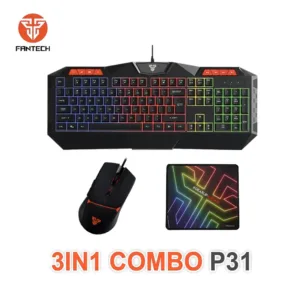
If the aula ak105 keyboard does not match your desk, browse these related items in our store. Havit MS1034 RGB Backlit Programmable Gaming Mouse is another gaming mouse in our range. Havit MS1027 Cool RGB LED Gaming Optical Mouse is a second gaming mouse option. A4TECH OP-720 Optical USB Wired Mouse is a wired mouse in our range, and Fantech P31 Keyboard, Mouse & Mousepad Combo is a keyboard and mouse combo set in our range.
For the full selection, see our Keyboards & Mouse category. Browsing the category is a good way to compare options before you decide.
Warranty and support
Warranty: 7 Days seller warranty.
Delivery, returns and ordering
Ordering the aula ak105 keyboard is straightforward. We deliver all over Bangladesh and you pay cash on delivery.
Delivery usually takes 1–3 days inside Dhaka city and 2–5 days outside Dhaka. You can return it within 7 days of delivery, and the full details are on our Delivery & Returns page.
Questions before ordering: call 09638054751, message us on Facebook Messenger or email care@gadgetsuperb.com.
Have your delivery address and a phone number ready when you place your order, so the delivery team can reach you. Read the policy page before you order if you have specific questions about returns.
If you are buying the aula ak105 keyboard as a gift, check the delivery window against the date you need it, and allow for the longer range outside Dhaka.
If you need the keyboard by a set date, order early enough to allow for the 2–5 day range outside Dhaka. Because payment is cash on delivery, keep your order details and the phone number you gave us handy on the day the parcel is due.
Frequently asked questions
What is the aula ak105 keyboard?
It is a full-size, USB wired membrane keyboard with 104 standard keys, according to the listing. It comes in black and includes a number pad.
Does the aula ak105 keyboard need a driver?
No driver installation is required, according to the listing. The maker describes the model as plug-and-play.
Is the aula ak105 keyboard wireless?
No. The listing describes a USB wired interface, so it connects with its attached USB cable.
Which operating systems does the aula ak105 keyboard support?
The listing gives the compatible OS as Windows 2000/XP/7/8/10 with basic input. For other systems, ask us before you order.
Is the aula ak105 keyboard good for office work?
The maker lists it as an office keyboard, with a full-size layout, membrane keys and a number pad. It suits staff, students and home users who want a plain, dependable keyboard. It is not described as a gaming model.
Does the aula ak105 keyboard have a warranty?
Warranty: 7 Days seller warranty.
How do I return the aula ak105 keyboard?
You can return it within 7 days of delivery. See our Delivery & Returns policy for the full details, and keep your order details handy.
Can I pay cash on delivery?
Yes. We deliver all over Bangladesh and you pay cash on delivery.
How long does delivery take?
Delivery usually takes 1–3 days inside Dhaka city and 2–5 days outside Dhaka. Order early if you need it by a set date.
Is the aula ak105 keyboard a gaming keyboard?
The listing presents it as an office keyboard, not a gaming model. Gaming mice are listed in the alternatives section.
Does the aula ak105 keyboard have a number pad?
Yes. The listing says it is full-size with 104 standard keys, including a number pad.
How can I ask questions before I order the aula ak105 keyboard?
Call 09638054751, message us on Facebook Messenger or email care@gadgetsuperb.com.
Related products
-25%
50 in stock
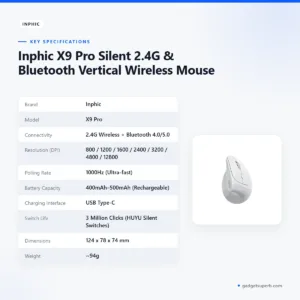

Inphic X9 Pro Silent 2.4G & Bluetooth Vertical Wireless Mouse
Original price was: ৳ 3,350.৳ 2,480Current price is: ৳ 2,480.-20%
50 in stock


Inphic M8P 2.4G Silent Wireless Mouse
Original price was: ৳ 1,190.৳ 950Current price is: ৳ 950.-23%
50 in stock


INPHIC B8 Office Wired Mouse
Original price was: ৳ 1,300.৳ 1,000Current price is: ৳ 1,000.
-26%
25 in stock
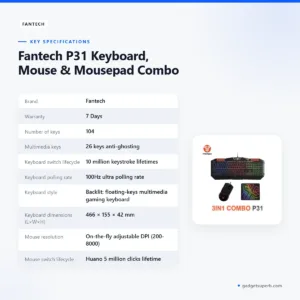
Fantech P31 Keyboard, Mouse & Mousepad Combo
Original price was: ৳ 3,110.৳ 2,300Current price is: ৳ 2,300. AULA AK105 USB Wired Black Key...
 Original price was: ৳ 940.৳ 750Current price is: ৳ 750.
48 in stock
Reviews
There are no reviews yet.