No products in the cart.

-28%


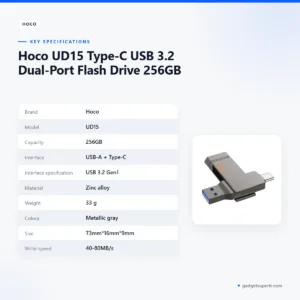

The Hoco UD15 flash drive is a 256GB Type-C USB 3.2 dual-port storage stick, listed with a USB-A connector and a Type-C connector on one body. It is made for people in Bangladesh who move documents, photos and project files between computers that use different ports.
- Overview
- Key features
- Specifications
- How to use / set up
- Compatibility and what is in the box
- Who should buy it in Bangladesh
- Alternatives in our store
- Warranty and support
- Delivery, returns and ordering
- Frequently asked questions
About the Hoco UD15 Flash Drive
The Hoco UD15 flash drive is a portable storage device from the Hoco brand, listed with 256GB of capacity in its product name. The listing describes it as a Type-C USB 3.2 dual-port drive, so one body carries a USB-A connector and a Type-C connector. Many buyers look at this combination rather than a single-port stick.
For a student in Dhaka, a freelancer or a small shop owner, a flash drive like this is often used to move documents, photos, lecture slides and project folders between machines. Because the drive has both a USB-A and a Type-C connector, it can save you from carrying an adapter when your devices use different ports. Check the ports on your own devices before you order, since the listing does not name the devices it supports.
The listing gives the material of the Hoco UD15 flash drive as zinc alloy and the colour as metallic gray, with a weight of 33 g and a size of 73mm*16mm*9mm. Those listed figures help you judge how the drive will sit in a shirt pocket, a laptop bag or a small pouch, but they do not say how it will feel in your hand. Keep the listed write and read speeds of the Hoco UD15 flash drive in mind when you plan large transfers.
Buyers in Bangladesh often weigh a flash drive against the way they work day to day. If you change between a laptop at the office and a home desktop, the Hoco UD15 flash drive is most useful as a simple carrier for documents and media. It is not a replacement for a cloud account or an external hard disk, and the listing does not describe it as one. For the maker’s own product details, visit the maker’s website.
Capacity should follow how much you carry and how often you refresh your files. A large photo library or video collection needs more room than a handful of documents, so think about your real workload first. Our store also lists the UD15 family in 32GB and 64GB versions, so you can compare the range before you settle on a size. Plan your choice around your own files, not around a single figure.
Key features
Dual-port USB-A and Type-C connectors
The listing names two connectors on this drive: USB-A and Type-C. In practice this means it can be plugged into an older USB-A port on a desktop, or into a Type-C port on a laptop or another device that has one. Whether a given device will work depends on that device, so check the port type on your machine before you rely on it for an important transfer. Many people keep a USB-A port on an older computer and a Type-C port on a newer laptop, so having both on one drive can save a trip to find an adapter.
USB 3.2 Gen1 interface
According to the listing, the interface specification of the Hoco UD15 flash drive is USB 3.2 Gen1. Check that listed interface against your computer’s ports and cables before you buy. The listing does not say which cables or computer ports were used for any speed figure, so treat the numbers as a guide rather than a promise. Let large copies finish before you unplug the drive, and eject it from your computer first so that your files are not left mid-transfer.
Listed read and write speeds
The listing gives a write speed of 40-80MB/s and a read speed of 160-200MB/s for the Hoco UD15 flash drive. Write speed matters when you save files onto the drive, such as a batch of photos or a folder of lecture videos, while read speed matters when you open files or copy them off. Both figures are listed as ranges, so do not expect one fixed number. Actual transfer times depend on your computer, the port in use, the cable and the size and type of your files. For a large folder, plan the copy for a time when you do not need the computer for other work.
Zinc alloy body and metallic gray finish
According to the listing, the body is made of zinc alloy and the colour is metallic gray. The listing gives the weight as 33 g, which is the only figure it provides about how the drive feels in the hand. Judge the feel for yourself once you have it. If you carry it with keys or coins, keep it in a small pouch, because the listing does not describe the surface finish in detail. Colour is also a personal choice, and the listing gives only one colour name.
Listed size of 73mm*16mm*9mm
The listing gives the size as 73mm*16mm*9mm, which is the figure to check against the space in a laptop bag, a shirt pocket or a small pouch. The listed dimensions do not say how the drive will sit beside a thick case or a second cable in a crowded port, so look at your own setup before you rely on it for daily use. Keep the Hoco UD15 flash drive in a small bag or pouch so that it does not get lost inside a larger bag. A pouch also helps keep the connectors clean in a dusty workplace.
Specifications
The specifications below for the Hoco UD15 flash drive come from the product listing and are reproduced as listed.
| Label | Value |
|---|---|
| Brand | Hoco |
| Model | UD15 |
| Capacity | 256GB |
| Interface | USB-A + Type-C |
| Interface specification | USB 3.2 Gen1 |
| Material | Zinc alloy |
| Weight | 33 g |
| Colour | Metallic gray |
| Size | 73mm*16mm*9mm |
| Write speed | 40-80MB/s |
| Read speed | 160-200MB/s |
These are listed specifications from the product listing, so read them as the maker’s figures rather than measured results.
How to use / set up
Before you first use the Hoco UD15 flash drive, check the port on the computer you plan to use. The two connectors are listed separately, so choose the one that matches your port and do not force either connector into a port of a different shape. Where possible, connect the drive directly to the computer rather than through a long chain of hubs when you start a large copy.
Follow the maker’s instructions if they are supplied with your order. Then use these general steps, which apply to most storage devices that connect over USB:
- Confirm which port your computer offers, USB-A or Type-C.
- Insert the Hoco UD15 flash drive firmly into that port.
- Wait for your computer to show the drive in its file manager before you copy anything.
- Copy your files, and let the copy finish before you remove the drive.
- Eject the drive with your operating system’s safe removal option before you unplug it.
Care for this drive is simple. Keep it in a pouch or a pocket away from heavy moisture, and avoid leaving it on a damp windowsill, since humidity can be high in Dhaka and other parts of Bangladesh. Store the Hoco UD15 flash drive in a dry drawer when you are not using it.
Load-shedding is a practical reason to plan ahead. Save your work, let any copy finish, eject the Hoco UD15 flash drive and then unplug it before a planned or sudden power cut. Keep a second copy of important files on another device as well, so that a single drive is never the only place your work is kept.
Before a large transfer, check the free space your computer reports so that the copy does not stop halfway. Keep folders organised by date or project, which makes it easier to find files later when you plug this drive into a different machine.
If the drive does not appear in your file manager, first try the other connector on the same device or a different port, then restart the computer and check again. If it still does not show, contact us with your device details so that we can help you narrow down the cause.
Compatibility and what is in the box
The listing confirms the interface of the Hoco UD15 flash drive as USB-A + Type-C, with USB 3.2 Gen1 as the interface specification. It does not list which operating systems, phones, tablets or televisions the drive supports, so compatibility beyond those ports is not confirmed by the listing.
The listing does not confirm what is in the package, so ask us before ordering if you need a cable, a pouch or any other accessory with your Hoco UD15 flash drive.
For a compatibility answer about your device, contact us by phone on 09638054751, by Facebook Messenger or at care@gadgetsuperb.com. Please give the exact model of your device, so that we can answer your question about this drive properly.
Once the drive is connected, check the file manager on your computer so you can see the space it reports before you start a large copy. If you plan to use the drive on a shared computer at a school or office, ask the owner of that machine first, so that the rules of that place are followed.
Who should buy it in Bangladesh
A university student in Dhaka who carries lecture slides, past papers and project files between a hostel room desktop and a laptop may find the Hoco UD15 flash drive useful, because it has both USB-A and Type-C connectors.
A freelance designer or writer working from home in Sylhet, Chattogram or Rajshahi may use the Hoco UD15 flash drive to hand over finished files to a client’s office computer. Check the client’s port type first, and agree on the file format before you send anything.
A small shop owner who keeps photos of stock, invoices and scanned documents on a counter computer may want an extra copy kept away from the counter. A drive like this can serve that purpose, but it should be one part of a wider habit of keeping copies, not the only one.
A family that wants a shared drive for school photos and holiday videos can use the Hoco UD15 flash drive to copy files between a home PC and a laptop. Large video files take longer than documents, so plan those transfers for a time when the power is stable.
A traveller who moves between Dhaka, Chattogram and a home district may want to carry a few working files on a drive rather than a laptop alone. Pack the Hoco UD15 flash drive in a pouch with your other small items, so that it stays dry and is easy to find at a checkpoint or hotel desk.
A office worker who uses a shared desktop at work may find a personal drive useful for moving reports home. Ask your employer about the rules for connecting personal storage before you plug anything into a work machine.
Who may not need it: if you only need a drive for small documents and already use a single-port stick without trouble, the extra port may not matter to you. Many buyers in this position are happy with the simplest option they already own.
Alternatives in our store
Compare the Hoco UD15 flash drive with these choices before you decide. If you want the same UD15 family in a different capacity, see the HOCO UD15 USB3.2 USB & Type -C flash drive(32GB) or the HOCO UD15 USB3.2 USB & Type -C flash drive(64GB), both in our flash drive range. For a memory card instead of a flash drive, see the Hoco MicroSD Memory Card 256GB, another storage item in our range. For another flash drive from the same brand, see the Hoco UD11 USB 3.0 USB Flash Drive, also a flash drive in our range. You can browse every storage item in our Storage category.
Start with the job you need to do. A flash drive suits moving files between machines, while a memory card may suit a device that takes a card. Use the category page to compare what is listed in the storage range before you choose a Hoco UD15 flash drive or a different item.
Warranty and support
Warranty: 7 Days seller warranty.
Delivery, returns and ordering
We deliver all over Bangladesh and you pay cash on delivery. Delivery usually takes 1–3 days inside Dhaka city and 2–5 days outside Dhaka. You can return it within 7 days of delivery (see our Delivery & Returns policy).
Ordering the Hoco UD15 flash drive is straightforward. Questions before ordering: call 09638054751, message us on Facebook Messenger or email care@gadgetsuperb.com.
Keep your delivery address and phone number accurate so the courier can reach you on the day. Cash on delivery means you pay when the parcel reaches you, so have the right amount ready if you can.
If you are unsure which capacity suits you, ask us before you order, so that you can pick the size that fits your files and avoid a return later.
Frequently asked questions
Is the Hoco UD15 flash drive 256GB?
Yes, the product name lists 256GB as the capacity of this drive. If you need a different size, see the alternatives section further up this page.
Does the Hoco UD15 flash drive have both USB-A and Type-C connectors?
Yes, according to the listing the interface of the Hoco UD15 flash drive is USB-A + Type-C. The listing does not say which devices each connector suits, so check your own ports.
What USB standard does the Hoco UD15 flash drive use?
According to the listing, the Hoco UD15 flash drive uses the USB 3.2 Gen1 interface specification. The listing does not give further detail about the speed you will see with every computer.
What read and write speeds are listed for the Hoco UD15 flash drive?
The listing gives a write speed of 40-80MB/s and a read speed of 160-200MB/s. These are listed ranges, and actual transfers depend on your computer and files.
What is the Hoco UD15 flash drive made of, and how heavy is it?
According to the listing, the material is zinc alloy and the weight is 33 g. The colour is listed as metallic gray and the size as 73mm*16mm*9mm.
Will the Hoco UD15 flash drive work with my phone?
The listing does not confirm phone compatibility, so we cannot say that it works with your phone. Send us your phone model by Facebook Messenger or email, and we will reply.
Is the Hoco UD15 flash drive sold in other capacities?
Our store also lists 32GB and 64GB versions of the Hoco UD15 flash drive, so you can compare sizes before choosing.
What warranty comes with the Hoco UD15 flash drive?
Warranty: 7 Days seller warranty.
How long does delivery take for the Hoco UD15 flash drive?
Delivery usually takes 1–3 days inside Dhaka city and 2–5 days outside Dhaka. We deliver all over Bangladesh, and you pay cash on delivery.
Related products
-23%
50 in stock

HOCO ES3 Pro ANC Bluetooth Wireless Neckband
Original price was: ৳ 1,990.৳ 1,530Current price is: ৳ 1,530.-26%
50 in stock
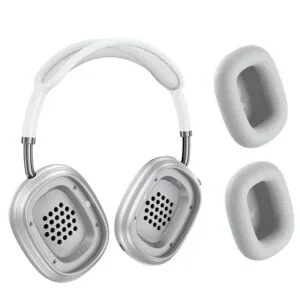

Hoco W65 Plus ANC Wireless Bluetooth Headphone
Original price was: ৳ 2,950.৳ 2,180Current price is: ৳ 2,180.-23%
45 in stock
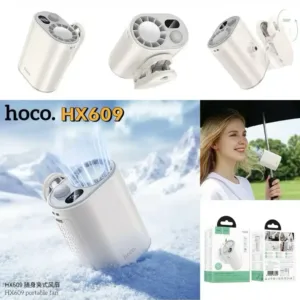
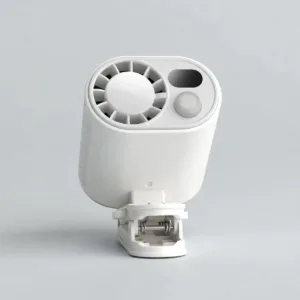
HOCO HX609 Portable Clip On Fan
Original price was: ৳ 2,250.৳ 1,730Current price is: ৳ 1,730.-23%
53 in stock
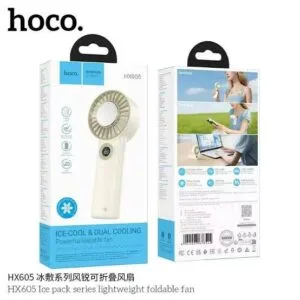
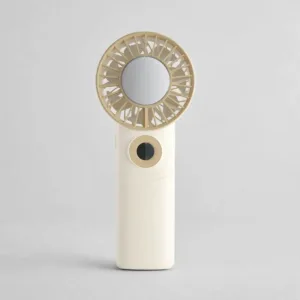
Hoco HX605 Ice Pack Series Foldable Fan 3600mAh
Original price was: ৳ 2,230.৳ 1,710Current price is: ৳ 1,710.-25%
50 in stock

 Hoco UD15 Type-C USB 3.2 Dual-...
Original price was: ৳ 7,360.৳ 5,290Current price is: ৳ 5,290.
43 in stock
Reviews
There are no reviews yet.