No products in the cart.

-25%

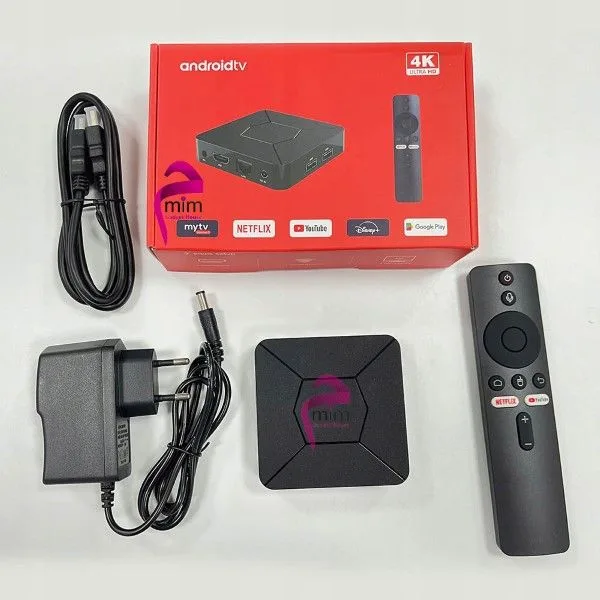


The Q5 Android TV Box is a streaming device that the listing describes as 4K, with Android 10, 2GB DDR3 RAM, 8GB built-in storage, a voice remote and IPTV compatibility. It suits Bangladeshi households that want apps, live channels and voice search on one television.
- Overview
- Key features
- Specifications
- How to use / set up
- Compatibility and what is in the box
- Who should buy it in Bangladesh
- Alternatives in our store
- Warranty and support
- Delivery, returns and ordering
- Frequently asked questions
Q5 Android TV Box overview
The Q5 Android TV Box is listed in our TV Boxes category. According to the listing, it runs Android 10, which gives a user-friendly interface and access to a large library of apps and games on the Google Play Store. You can customise the home screen, install your preferred streaming apps and explore a wide range of entertainment options with this Q5 Android TV Box.
One Q5 Android TV Box can sit beside an existing television and bring streaming apps, live channels through IPTV and voice control into one place. The listing names built-in WiFi and Bluetooth 5.2 compatibility, which suits people who stream over a home internet connection and want wireless keyboards or headphones. Think of the device as a link between your television and the services you already use. It does not replace those services. A subscription, an app account or an IPTV provider remains your own choice, and the listing does not name any of them.
Power supply matters across Bangladesh. Load-shedding will interrupt any streaming device, including the Q5 Android TV Box, so plan evening viewing around power cuts where you can. Humidity is also common in many parts of the country, so keep this Q5 Android TV Box in a dry, ventilated place where air can move around it. Keeping these points in mind helps you judge what the device can and cannot do in your household.
How to choose a box like this comes down to four questions: which apps you use, how your home internet performs at busy hours, what television you have, and how much you want to rely on voice search. Write down your answers before you order. The listing gives a clear set of facts to compare, which makes it easier to see where the Q5 Android TV Box fits.
Key features
The listing groups the main features into a few headings. Each section below follows the maker’s wording for the Q5 Android TV Box and attributes claims to the listing.
Android 10 on the Q5 Android TV Box
According to the listing, the Q5 Android TV Box is powered by Android 10, an operating system the maker describes as user-friendly. The maker says it gives access to a vast library of apps and games available on the Google Play Store, so you can add the streaming, music and video apps you already use. You can customise the home screen and arrange the apps you open most often. The listing does not name any apps that come preinstalled, so after setup take a few minutes to review the home screen and remove anything you do not need. If you already use Google Play on an Android phone, installing apps on the box will feel familiar. Keep the number of apps modest, because a crowded home screen is harder to navigate with a remote.
Memory and storage on the Q5 Android TV Box
The listing gives 2GB of DDR3 RAM and 8GB of built-in storage for this model. The maker says the storage leaves room for apps, games and multimedia content, and that you can download movies and stream content without worrying about storage limitations or performance issues. Those are the maker’s words, not a measured result. The listing does not give a performance figure or say how many apps the storage can hold. The 8GB figure is the total built-in storage listed, so keep your app list sensible if you plan to keep downloads on the device. A practical habit is to remove apps and downloads you no longer use and to check available storage from time to time. Anyone who expects to keep large collections of files on the box should plan for that when they choose the Q5 Android TV Box.
Connectivity on the Q5 Android TV Box
According to the listing, the Q5 Android TV Box has built-in WiFi and Bluetooth 5.2 compatibility. The maker says this ensures fast and reliable connectivity, so you can connect to your home network wirelessly and stream without interruptions. Those are the maker’s claims. The listing does not give a speed figure, so streaming quality will also depend on your broadband plan and your router. If the box sits far from your router, check the signal in the place where you watch. The Bluetooth feature is described as a way to connect wireless peripherals such as keyboards, game controllers and headphones. Set up the network first, then pair accessories one at a time, so any problem is easier to trace back to its source.
Voice remote for the Q5 Android TV Box
The listing states that the Q5 Android TV Box includes a voice remote control. According to the maker, the remote lets you navigate through menus, search for content and control your streaming experience with simple voice commands. The listing describes this as a convenience that enhances the overall user experience. Voice search is most useful when you want a film or channel quickly and do not want to scroll through long lists. The listing does not describe the full set of voice commands, so check what your remote can do after setup and read the maker’s instructions. Families with several viewers may find voice search the quickest way to pick something to watch on the Q5 Android TV Box.
IPTV compatibility on the Q5 Android TV Box
The listing describes the box as IPTV compatible, allowing access to live TV channels, on-demand content and a variety of international channels. According to the listing, this lets you enjoy a broad range of entertainment without a separate cable or satellite subscription. IPTV access depends on the service you choose, its terms and its channel line-up, and the listing does not name any provider. Before you rely on a service, check that it runs properly on Android devices, and on this Q5 Android TV Box if the provider lists supported devices. Live channels also need a steady data connection, so consider your home internet before you subscribe.
Specifications
The table below lists the specifications for the Q5 Android TV Box as they appear in the product listing, so you can check the basics before you order.
| Label | Value |
|---|---|
| Product | Q5 Android TV Box |
| Brand | Q5 |
| Model | Q5 |
| Category | TV Boxes |
| Operating system | Android 10 |
| Resolution | 4K (as written in the product name) |
| RAM | 2GB DDR3 |
| Built-in storage | 8GB |
| Connectivity | Built-in WiFi and Bluetooth 5.2 |
| Remote | Voice remote control |
| IPTV | Compatible, according to the listing |
| Warranty | 7 Days |
These are listed specifications from the product listing.
How to use / set up
Start by placing the Q5 Android TV Box where it has space and a clear route to your television. Keep it away from direct heat and make sure the air around it is not blocked. Humidity is common across Bangladesh, so keep the box dry and avoid damp corners, cramped shelves or spots near a window that gets wet during the monsoon.
Follow the maker’s instructions to connect the power supply and the video connection between the Q5 Android TV Box and your television. Connect it to your television first, then start the box and follow the maker’s instructions to complete the first start-up. Take your time with this step, because a rushed start-up is harder to fix later.
Before first use, read the maker’s instructions for the remote and the box, and keep the remote somewhere safe and away from heat when you are not using it.
Once your Q5 Android TV Box is online, you can sign in to the Google Play Store to add apps. The listing describes the store as the source of apps and games, so install streaming apps only from the store and update the system if the maker prompts you to do so.
Customise the home screen on your Q5 Android TV Box, then install your preferred streaming apps one at a time. Pair a Bluetooth keyboard, game controller or headphones only after setup, following the maker’s instructions for each device. Adding one item at a time makes it easier to spot which one causes a problem.
Care is simple. Keep the Q5 Android TV Box out of direct sun, away from dust and away from damp. Clean the outside with a dry, soft cloth, and do not spray liquid near the ports. Good airflow around the box helps it stay comfortable during long viewing sessions in warm weather.
Power cuts will stop streaming, so plan around them. Use the power arrangement the maker describes and avoid overloaded sockets. A stable power point is easier to manage than a shared extension that many devices depend on.
Before you rely on IPTV, check that your chosen service runs properly on the box and that your home internet connection is stable at the times you watch. If you are unsure which model you need, ask us before you order.
Compatibility and what is in the box
For the Q5 Android TV Box, the listing confirms several points. It includes a voice remote control, it has built-in WiFi and Bluetooth 5.2 compatibility, it runs Android 10 with access to the Google Play Store, and it is listed as IPTV compatible. These are the points you can rely on when you decide.
The listing does not state a full list of accessories or a power supply specification, so those details are not confirmed by the listing. Ask us before you order if you need them, rather than assuming what the package contains.
Television compatibility depends on the connections your set has, and the listing does not describe them. If you use a projector or an older screen, check its connection options and the maker’s instructions before you buy. A quick check of your television’s ports will save time on delivery day.
Streaming on the Q5 Android TV Box depends on the internet connection in your home. The listing gives no streaming speed figure, so check your broadband plan and keep the router within a reasonable range. In a household where several phones, computers and televisions share one connection, the speed you actually receive may matter as much as the device itself.
Storage and apps are also a compatibility question, because the listed 8GB has to hold every app you add. Check that the streaming services you want to use are available through the Google Play Store before you commit to them.
Who should buy it in Bangladesh
The Q5 Android TV Box suits several realistic buyers. Think about your viewing habits, your home internet connection and the television you already own.
Family evening viewers: if your household wants one place to open streaming apps and live channels, the Q5 Android TV Box fits the brief the listing describes. A single box in the living room can serve everyone, and the voice remote lets a family member search for a film without scrolling through long lists.
Renters and people who move house: a separate TV box is simpler to unplug and take with you than a set with built-in smart features. You should still check the connections on each new television before you move the box.
Casual gamers and Bluetooth users: the listing says you can use games from the Google Play Store and connect a Bluetooth game controller or headphones. If that matches how you spend evenings, one purchase can cover both needs.
Students and first-time buyers: if you want a simple way to watch films and try Android for the first time, the box keeps the basics in one place. Start with the apps you need and add others later.
IPTV subscribers: if you already pay for an IPTV service, check it on the box before you order, since the listing does not name providers or confirm that any particular service works.
Buyers who need something the listing does not state: if you need a specific video format, a particular connector or a stated resolution beyond the 4K in the product name, the listing does not confirm it. In that case, look at the alternatives below or ask us.
Alternatives in our store
If the Q5 Android TV Box is not the right fit, these are other Android TV boxes in our range. Each one has its own product page, and you can open it from the links below.
You can look at Android TV Box- MXQ Pro 4K Internet TV (1GB, 8GB), another Android TV box in our range. For a different model, see Q35 4K/8K Android OTT Streamer Smart TV Box (2GB RAM / 16GB ROM) with Voice Remote & Built-in CCTV Apps Support, also an Android TV box in our range. Also consider TX20 Pro 12K Ultra HD Smart Android TV Box, a further Android TV box, and TX60 Pro 24K Ultra HD Smart Android TV Box with Voice Control Remote, another Android TV box in our range. To browse the full selection, visit our TV Boxes category.
Warranty and support
Warranty: 7 Days seller warranty.
Delivery, returns and ordering
We deliver all over Bangladesh and you pay cash on delivery. Delivery usually takes 1–3 days inside Dhaka city and 2–5 days outside Dhaka. Buyers outside Dhaka can order in the same way, so allow for the longer delivery window when you plan a date.
You can return it within 7 days of delivery (see our Delivery & Returns policy). Questions before ordering: call 09638054751, message us on Facebook Messenger or email care@gadgetsuperb.com.
Read the full terms on our Delivery & Returns policy page before you order the Q5 Android TV Box, and have your delivery details ready when you place the order.
Frequently asked questions
Is the Q5 Android TV Box listed as 4K?
Yes, the Q5 Android TV Box is listed as 4K in its product name. The listing does not add further resolution details, so check the description before you decide.
What operating system does the box use?
According to the listing, the box is powered by Android 10, with access to apps and games on the Google Play Store.
How much RAM and storage does it have?
The listing gives 2GB of DDR3 RAM and 8GB of built-in storage.
Does it come with a voice remote?
The listing states that it includes a voice remote control, which you can use to navigate menus, search for content and control streaming with simple voice commands.
Is it IPTV compatible?
Yes, the listing describes it as IPTV compatible. Access depends on the IPTV service you choose, and the listing does not name a provider.
Which connectivity options does the listing name?
The listing names built-in WiFi and Bluetooth 5.2 compatibility, which you can use to connect to your home network and wireless accessories.
Can I connect a Bluetooth keyboard or game controller?
The listing says the Bluetooth feature lets you connect wireless peripherals such as keyboards, game controllers and headphones.
Does the listing show a warranty?
Yes, the listing shows a warranty value of 7 Days.
How do I return it?
You can return it within 7 days of delivery, as set out in our Delivery and Returns policy.
Is cash on delivery available?
Yes, we deliver all over Bangladesh and you pay cash on delivery. Delivery usually takes 1–3 days inside Dhaka city and 2–5 days outside Dhaka.
How can I ask a question before ordering?
Call 09638054751, message us on Facebook Messenger or email care@gadgetsuperb.com.
Can I use it with a projector?
The listing does not confirm projector connections, so check the connection options on your projector and read the maker’s instructions before you buy.
For background on the wider category of devices, see the background on consumer electronics.
Related products
-25%
65 in stock

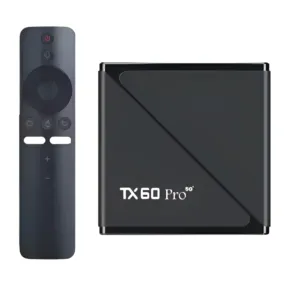
TX60 Pro 24K Ultra HD Smart Android TV Box with Voice Control Remote
Original price was: ৳ 3,350.৳ 2,480Current price is: ৳ 2,480.-25%
50 in stock


TX20 Pro 12K Ultra HD Smart Android TV Box
Original price was: ৳ 3,350.৳ 2,480Current price is: ৳ 2,480.-28%
50 in stock


Q35 4K/8K Android OTT Streamer Smart TV Box (2GB RAM / 16GB ROM) with Voice Remote & Built-in CCTV Apps Support
Original price was: ৳ 6,080.৳ 4,370Current price is: ৳ 4,370.-26%
50 in stock


Android TV Box- MXQ Pro 4K Internet TV (1GB, 8GB)
Original price was: ৳ 2,800.৳ 2,070Current price is: ৳ 2,070. Q5 Android tv box 4k 2GB ram 8...
Original price was: ৳ 3,740.৳ 2,770Current price is: ৳ 2,770.
50 in stock
Reviews
There are no reviews yet.