No products in the cart.

-25%


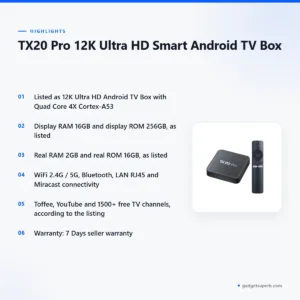
The TX20 Pro TV box is an Android TV box for Bangladeshi viewers who want to turn an existing television into a smart screen. According to the listing, it is a 12K Ultra HD Smart Android TV Box with a Quad Core processor, Wi-Fi, Bluetooth and a voice remote, aimed at people who already own a TV, monitor or projector.
- Overview
- Key features
- Specifications
- How to use and set up
- Compatibility and what is in the box
- Who should buy it in Bangladesh
- Alternatives in our store
- Warranty and support
- Delivery, returns and ordering
- Frequently asked questions
Overview of the TX20 Pro TV box
The TX20 Pro TV box suits people who want smart TV features on a television, monitor or projector they already own. The listing describes it as a 12K Ultra HD Android TV Box built around a Quad Core 4X Cortex-A53 processor, with a clock speed listed as 480 MHz to 1.30 GHz. Because the box works with the screen you already have, you do not need to replace the whole set before you start watching online.
The maker lists Toffee, YouTube and 1500+ free TV channels, and says free dish channels and all kinds of sports channels are included. For many households in Dhaka, Chattogram, Sylhet and beyond, those lines point to free channel options and sports on a large screen, which is often why people look at a box like this. The listing also names Disney, Netflix and Prime Video under support. It does not say which subscriptions you need, so check the services you already use before you order a TX20 Pro TV box.
The listing gives the origin as China. Read the specifications alongside your television’s own details, your internet connection and the services you plan to use. For background on how devices like this fit into the wider category, see the background on consumer electronics. A TX20 Pro TV box makes most sense when you already have a reliable connection and want one remote-controlled device for several services. Ask us anything you are unsure about before you order, because a short question now saves time later.
Many Bangladeshi households already own a flat-screen television and do not want to replace it just to get streaming. A box like this keeps the existing screen in use and adds the streaming layer on top, which suits families who want to keep an older set working for longer. Think about where the box will sit, how far it is from the router, and which input you will use on the television before you decide.
Key features
Processor and graphics
The listing describes a Quad Core 4X Cortex-A53 processor with a clock speed of 480 MHz – 1.30 GHz. Graphics are listed as ARM Mali-G31, and the GPU vendor is also given as ARM Mali-G31. The listing does not give benchmark results or describe how the processor performs with particular apps, so read these lines as the maker’s description. For a TX20 Pro TV box, the practical question is how the box handles the viewing you do most, such as evening streaming or browsing menus during the day. If you plan heavier use, ask us before you order.
Memory and storage
The TX20 Pro TV box listing shows two sets of figures. Display RAM is listed as 16GB and display ROM as 256GB, while real RAM is listed as 2GB and real ROM as 16GB. The listing does not explain the difference between these figures, so read both sets as they are written. Storage matters if you install many apps or keep downloaded content, and the listing also names USB and TF card slots. Ask us to confirm how each figure applies before you rely on it.
Wireless and wired connectivity
The TX20 Pro TV box listing gives wireless connectivity as WiFi 2.4G / 5G with Bluetooth, and lists LAN RJ45 for a wired connection. It also names DLNA and Miracast. Miracast is listed under screen mirroring, so a compatible phone or laptop may be able to mirror to the television, although the listing does not name which devices work. If your router offers both 2.4G and 5G networks, you can choose which one to join during setup. Check your own router details before you rely on any connection method.
Audio and video outputs
The listing names Bluetooth, HDMI, AV, Dolby Digital and DTS under audio, without giving further detail. It describes the product name as 12K Ultra HD, but it does not say which display resolutions your television supports. Check your TV’s own input list and specifications before you buy, especially if your screen is an older set. If you use a separate sound system, keep the listed audio options in mind when you plan the connection.
Voice remote and Bluetooth
The listing says Bluetooth and voice remote: Yes. A voice remote lets you speak commands instead of relying only on pressing buttons, which can be handy when searching for a programme or channel by name. The listing does not describe the remote’s layout, pairing steps or on-screen prompts, so follow the maker’s instructions for the first connection. The TX20 Pro TV box listing does not say which other Bluetooth devices it pairs with, so check that before you buy accessories.
Listed channels and services
The listing lists Toffee, YouTube and 1500+ free TV channels. It also says dish channels are free and that all kinds of sports channels are free, and it names Disney, Netflix and Prime Video under support. Whether each service is available in Bangladesh, and whether you need your own account or subscription, is not confirmed by the listing. Check the apps you use most before you order the TX20 Pro TV box, and treat this list as the maker’s description rather than a promise.
Specifications
The table below sets out the TX20 Pro TV box specifications as the product listing gives them, with no added figures.
| Processor | Quad Core 4X Cortex-A53 x 1.30 GHz |
| Clock speed | 480 MHz – 1.30 GHz |
| Graphics | ARM Mali-G31 |
| RAM (display) | 16GB |
| Storage (display) | 256GB |
| Real RAM | 2GB |
| Real ROM | 16GB |
| Operating system | Android 15 |
| Google Play Services | 23.31.15 |
| Wi-Fi | WiFi 2.4G / 5G |
| Connectivity | DLNA, Miracast, Bluetooth, LAN RJ45 |
| Audio | Bluetooth, HDMI, AV, Dolby Digital, DTS |
| Card slot | USB and TF |
| Power adapter | 5V, 2A |
These are listed specifications from the product listing.
How to use and set up
Setting up the TX20 Pro TV box is easier when you prepare first. Check that your television has a free HDMI port, confirm your Wi-Fi network name and password, and keep your order confirmation to hand. The listing does not describe a set-up sequence, so follow the maker’s instructions for the screens you see during the first start.
Start with power for your TX20 Pro TV box. The listing gives the power adapter as 5V, 2A, so use an adapter that matches that rating and place it where you can reach it easily. If the remote needs charging, charge fully before first use, and follow the maker’s instructions for any other step.
Next, connect the TX20 Pro TV box to your television. The listing names HDMI and AV among its audio options, so if your television has an HDMI port, use that connection and then select the matching input on the TV. For a wired network, use the LAN RJ45 connection; otherwise join your WiFi 2.4G or 5G network during the first setup. Keep the network details written down somewhere safe so you can reconnect quickly later.
Pairing the voice remote for your TX20 Pro TV box follows the maker’s instructions. The listing says Bluetooth and voice remote: Yes, but it does not describe the buttons, pairing order or on-screen prompts, so the maker’s guide is the right reference. If the remote does not respond, check that it is within range of the box and follow the maker’s pairing steps again.
Load-shedding can interrupt power in many areas. If the power goes off while you are using the TX20 Pro TV box, wait for the supply to return and let the box start normally before you press anything. Avoid unplugging it during an update or while you are saving changes, and keep your Wi-Fi details handy so you can reconnect after a cut.
Humidity is common in many parts of Bangladesh during the monsoon. Keeping the TX20 Pro TV box dry is a simple habit: place it in a ventilated spot away from direct heat and damp surfaces, and do not stack other electronics on top of it. Clean the casing with a soft, dry cloth, and keep cables tidy so they are not pulled loose.
Once the box has started, take a few minutes to check that the picture appears on the screen you expect and that sound comes through the connection you chose. If the picture or sound is not right, check the input selection on your television first, then review the connection cable, and follow the maker’s instructions for any further steps. Keep notes of anything you change so you can return to an earlier setting.
Before you order, confirm that the model shown as TX20 matches the box you intend to buy, because the listing alone does not show every variant. Keep your order details to hand if you contact us about the setup.
Compatibility and what is in the box
According to the listing, the TX20 Pro TV box can convert a TV, Monitor, LED TV, Smart TV, Projector, CRT TV or Box TV into an Android smart TV. That is the maker’s description of use, and it does not guarantee that every screen will behave in the same way, so check your screen’s inputs before you order.
Confirmed items from the listing include Android 15, Google Play Services 23.31.15, Miracast screen mirroring, DLNA, Bluetooth, a LAN RJ45 connection, USB and TF card slots, and a voice remote listed as Yes. Those are the points you can confirm from the product page. The TX20 Pro TV box is listed with a 5V, 2A power adapter, so match that rating when you plug it in.
What is not confirmed: the listing does not say what comes in the box, which remote model you receive, what battery arrangement the remote uses, which streaming services are available in Bangladesh, or which television models the TX20 Pro TV box supports. These points are not confirmed by the listing, so ask us before you order if any of them matter to you.
If you plan to use a USB or TF card, check the file types you intend to play. For a TX20 Pro TV box, the listing does not list supported formats, so ask us before ordering if this matters for your viewing.
For many Bangladeshi viewers, the question is less about the box and more about the screen. The listing names CRT and box televisions among the screens it can convert, so if you have one of these, check its inputs and connections against the listing before you order.
Who should buy it in Bangladesh
A household in Dhaka with an older LED television often wants a simple route to streaming and free channels without buying a new set. For that buyer, the TX20 Pro TV box is worth a look because the listing names Toffee, YouTube and 1500+ free TV channels. Check your service list before you order, and ask us about any app you cannot find in the listing.
A family outside Dhaka that relies on local channels and sports may find the listed channel options useful. Delivery outside Dhaka usually takes 2–5 days, so plan the timing around any event you want to watch. The TX20 Pro TV box suits this kind of viewer when the channels they want are named on the listing.
A student or young professional who streams on a monitor or projector at home might want a box that can turn that screen into an Android smart TV. The listing names monitor and projector among the screens it can convert, but you should confirm the input your screen uses before buying. The TX20 Pro TV box may be a useful option for that setup.
Someone who plans heavy gaming or demanding apps should ask us first, because the listing describes streaming, free channels and screen mirroring and does not mention gaming. Viewers who want a longer warranty than the listed period should also ask before buying. Returns are covered by our policy, which is separate from the warranty.
Buyers in smaller flats often ask about space. The listing does not give dimensions, so do not assume a size; ask us before ordering if placement matters to you. Check where the power socket and television input sit before you decide where the box will go.
Alternatives in our store
If the TX20 Pro TV box is not the right fit, you may want to compare other options in our range. Consider Android TV Box- MXQ Pro 4K Internet TV (1GB, 8GB), which is another TV box in our range. You could also look at Q35 4K/8K Android OTT Streamer Smart TV Box (2GB RAM / 16GB ROM) with Voice Remote & Built-in CCTV Apps Support, which is another streamer in our TV box category. For a different option, see Q5 Android tv box 4k 2GB ram 8GB Storage Voice Remote IPTV compatible, another Android TV box in our range. Finally, TX60 Pro 24K Ultra HD Smart Android TV Box with Voice Control Remote is another TV box in our range. To compare every listed option, browse the TV Boxes category.
When you compare, start with the screen you already own, then the services you watch, then the connection options listed on each product page. A short list of questions to ask us can save you a return later. Each page lists its own facts, so read the full listing before you decide.
Warranty and support
Warranty: 7 Days seller warranty.
Delivery, returns and ordering
Ordering a TX20 Pro TV box is straightforward. We deliver all over Bangladesh and you pay cash on delivery.
Delivery usually takes 1–3 days inside Dhaka city and 2–5 days outside Dhaka.
You can return it within 7 days of delivery. The full terms are on our Delivery and Returns policy page.
Questions before ordering: call 09638054751, message us on Facebook Messenger or email care@gadgetsuperb.com. We are happy to answer questions about the listing before you place your order.
Plan your order around the delivery times above. If you are outside Dhaka, allow for the longer end of the range, and keep your phone reachable on delivery day so the courier can confirm the address. Because payment is cash on delivery, have the payment ready when your order arrives.
Frequently asked questions
What is the TX20 Pro TV box?
The TX20 Pro TV box is an Android TV box that the listing describes as 12K Ultra HD, with a Quad Core 4X Cortex-A53 processor. According to the listing, it converts a TV, monitor or projector into an Android smart TV.
Who is the TX20 Pro TV box for?
The TX20 Pro TV box may suit people who want smart TV features on a screen they already own. It can fit a household that watches free channels, or a viewer who streams from a monitor or projector.
Does the TX20 Pro TV box include a remote?
The listing shows Bluetooth and voice remote: Yes, so a voice remote is listed. It does not confirm what else comes in the box, so ask us before you order.
How much RAM and storage does the TX20 Pro TV box have?
The listing shows display RAM of 16GB and display ROM of 256GB, and real RAM of 2GB and real ROM of 16GB. It does not explain the difference, so ask us if you need help reading those figures for the TX20 Pro TV box.
Can the TX20 Pro TV box connect to Wi-Fi?
Yes, according to the listing, which gives wireless connectivity as WiFi 2.4G / 5G with Bluetooth. The listing also shows a LAN RJ45 connection for a wired network.
Does the TX20 Pro TV box support Netflix and YouTube?
According to the listing, it names Disney, Netflix and Prime Video under support, and lists YouTube with Toffee and 1500+ free TV channels. Availability in Bangladesh and any account needs are not stated in the listing.
What is the warranty on the TX20 Pro TV box?
Warranty: 7 Days seller warranty.
How long does delivery take in Bangladesh?
Delivery usually takes 1–3 days inside Dhaka city and 2–5 days outside Dhaka. We deliver all over Bangladesh and you pay cash on delivery.
Can I return the TX20 Pro TV box?
Yes, you can return it within 7 days of delivery. See our Delivery and Returns policy for the full terms.
Where do I ask questions before ordering?
Call 09638054751, message us on Facebook Messenger or email care@gadgetsuperb.com. We are happy to help before you place your order.
Is the TX20 Pro TV box compatible with my TV?
The listing says it can convert a TV, monitor, LED TV, Smart TV, projector, CRT TV or box TV into an Android smart TV. Confirm your model before you order.
Learn more about the wider category on the background on consumer electronics.
Related products
-25%
65 in stock

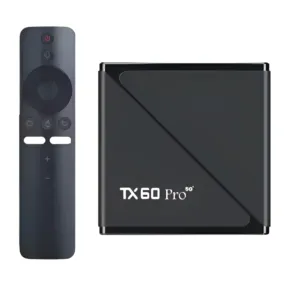
TX60 Pro 24K Ultra HD Smart Android TV Box with Voice Control Remote
Original price was: ৳ 3,350.৳ 2,480Current price is: ৳ 2,480.-25%
50 in stock


Q5 Android tv box 4k 2GB ram 8GB Storage Voice Remote IPTV compatible
Original price was: ৳ 3,740.৳ 2,770Current price is: ৳ 2,770.-28%
50 in stock


Q35 4K/8K Android OTT Streamer Smart TV Box (2GB RAM / 16GB ROM) with Voice Remote & Built-in CCTV Apps Support
Original price was: ৳ 6,080.৳ 4,370Current price is: ৳ 4,370.-26%
50 in stock


Android TV Box- MXQ Pro 4K Internet TV (1GB, 8GB)
Original price was: ৳ 2,800.৳ 2,070Current price is: ৳ 2,070. TX20 Pro 12K Ultra HD Smart An...
Original price was: ৳ 3,350.৳ 2,480Current price is: ৳ 2,480.
50 in stock
Reviews
There are no reviews yet.