No products in the cart.

-25%
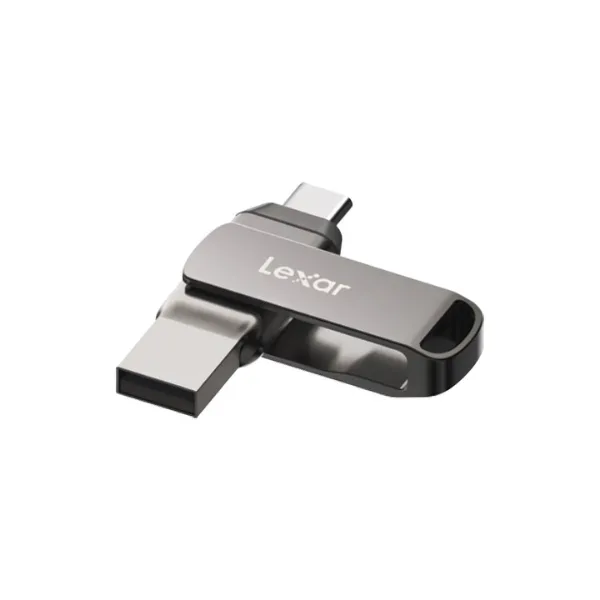
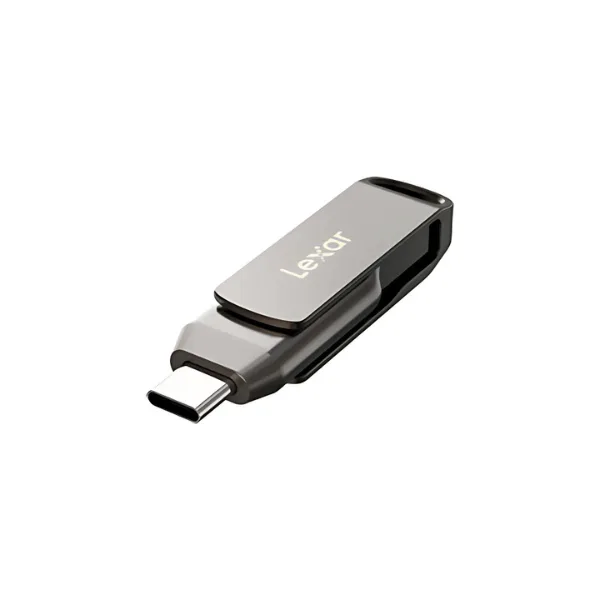



The lexar d400 is a Lexar JumpDrive Dual Drive D400 pen drive with USB Type-A and Type-C connectors. It suits students, families, office workers and small traders in Bangladesh who need a compact drive for photos, videos and large files on a PC or a Mac.
- Overview
- Key features
- Specifications
- How to use and set up
- Compatibility and contents
- Who should buy it in Bangladesh
- Alternatives in our store
- Warranty and support
- Delivery, returns and ordering
- Frequently asked questions
What the lexar d400 is and who it suits
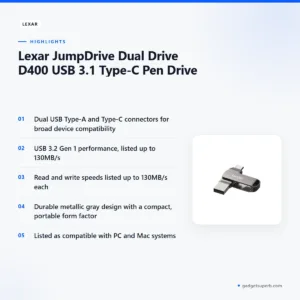
The lexar d400 is built around dual connectors. The listing describes USB Type-A and Type-C connectors for broad device compatibility, so the drive gives you a choice of port. The maker lists a durable metallic gray design and a compact, portable form factor, which makes the lexar d400 easy to carry in a bag or a pocket.
For Bangladeshi buyers, the practical question is what you plan to store. According to the listing, the lexar d400 is ideal for quick storage and transfer of photos, videos and large files, and it is listed as compatible with PC and Mac systems. That covers a lot of everyday work, from carrying a presentation to a class to moving holiday photos from a laptop. A drive like this works best as a way to move files, with a second copy kept elsewhere.
The maker is Lexar. For the maker’s own product information, visit the maker’s website. Use that link to check the wording for the lexar d400 before you rely on any figure. Our page sets out the listed specifications, the setup basics, what is confirmed and what is not, and the store’s delivery terms.
Key features
Dual USB Type-A and Type-C connectors
The listing describes dual USB Type-A and Type-C connectors for broad device compatibility. In practical terms, the lexar d400 gives you a choice of port, so the same stick can serve a computer with standard USB sockets and a machine with USB Type-C ports. Before you buy, look at the ports on the devices you plan to use most. Matching the connector to the port is the simplest way to confirm that the lexar d400 suits your setup, and it saves you hunting for an adaptor when you are in a hurry.
USB 3.2 Gen 1 performance for fast transfers
According to the listing, the lexar d400 uses USB 3.2 Gen 1 performance for fast data transfers. The maker lists read speeds up to 130MB/s and write speeds up to 130MB/s. These are stated maximum figures, so treat them as the maker’s limits rather than a result you can count on for every computer. Actual transfer time also depends on the port you use, the files you copy and what else your computer is doing. For a folder of photos or a long video, the listed figures give a starting point when you compare the lexar d400 with other drives in our range.
Metallic gray, compact and portable
The listing describes a durable metallic gray design and a compact, portable form factor. The colour is listed as Metallic Gray. The dimensions are listed as 60.6mm x 16.2mm x 9.7mm, and the weight as 17.8 grams. These figures help you plan where the lexar d400 will live, whether that is a keyring, the front pocket of a backpack or a shared laptop bag. A small drive is easy to misplace, so give it a fixed place in your bag and check that spot each time you leave the house.
PC and Mac compatibility
The listing says the lexar d400 is compatible with PC and Mac systems, and it gives the system requirement as PC and Mac systems. For a home or office that uses both platforms, one drive covers both, which can be simpler than keeping two separate sticks. If you move files between a Windows laptop and a Mac, keep one labelled drive for that purpose. The listing does not give operating system version details, so check the version on your own machine. Before you rely on the lexar d400 for important work, copy a small file on each computer first.
Care and handling in Bangladesh conditions
The listing gives an operating range of 0 to 50 degrees Celsius and a storage range of -10 to 70 degrees Celsius. In Bangladesh, these ranges are worth remembering during the hot months, when a room with the fan off or a parked vehicle can be warmer than you expect. Keep the drive away from direct sun and damp surfaces. In the monsoon, store it in a dry pouch, and let a damp bag air out before you put the drive inside. These are general handling habits, not claims about how the drive performs in any particular condition.
Everyday transfers and file organisation
Organised folders make a pen drive more useful. Name each folder by subject and date, and keep the largest files together so that a copy can be repeated easily. Before you unplug the lexar d400, check on your screen that the copy has finished. A tidy drive is easier to hand to a colleague or classmate, and it reduces the chance of copying an old version by mistake.
Specifications
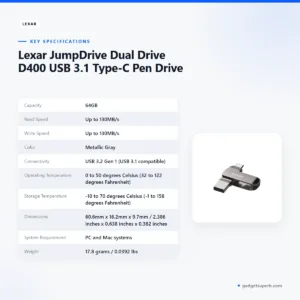
The table below sets out the specifications for the lexar d400 exactly as they appear in the product listing. The listing’s attributes also name 128GB, while its specifications give 64GB, so use the table as the reference for capacity.
| Label | Value |
|---|---|
| Capacity | 64GB |
| Read Speed | Up to 130MB/s |
| Write Speed | Up to 130MB/s |
| Color | Metallic Gray |
| Connectivity | USB 3.2 Gen 1 (USB 3.1 compatible) |
| Operating Temperature | 0 to 50 degrees Celsius (32 to 122 degrees Fahrenheit) |
| Storage Temperature | -10 to 70 degrees Celsius (-1 to 158 degrees Fahrenheit) |
| Dimensions | 60.6mm x 16.2mm x 9.7mm / 2.386 inches x 0.638 inches x 0.382 inches |
| System Requirement | PC and Mac systems |
| Weight | 17.8 grams / 0.0392 lbs |
These are listed specifications from the product listing for the lexar d400, so treat the maker’s figures as the reference point.
How to use and set up the lexar d400
Setting up the lexar d400 is simple. Plug the drive into a free USB port that matches its connector, then follow the maker’s instructions for your operating system. Once your computer recognises the drive, you can open it like any other storage device and copy files in either direction. If it does not appear, try a different port on the same computer before you assume a fault.
Before you copy important files, make a second copy of anything that matters. A pen drive such as the lexar d400 is a convenient way to carry data, but it should not be your only copy of family photos, certificates or work files. Store the second copy on a separate device or in another place, so that one fault or one lost bag does not remove everything at once.
When a transfer is finished, use your computer’s safe-removal option before you pull the drive out. This matters in Bangladesh, where a power cut can interrupt a copy in progress and leave a file incomplete. Wait until the copy has fully finished, then remove the lexar d400 from the port.
Keep the drive within the temperature ranges listed by the maker. The listing gives an operating range of 0 to 50 degrees Celsius (32 to 122 degrees Fahrenheit) and a storage range of -10 to 70 degrees Celsius (-1 to 158 degrees Fahrenheit). In a Dhaka summer, a bag left in direct sun can get hot, so keep the lexar d400 somewhere cool when it is not in use.
Humidity is high for much of the year in Bangladesh. During the monsoon, drying a damp bag or pocket before you use the lexar d400 is a sensible habit. Store the drive in a clean, dry pouch so that it stays tidy and easy to find. Keep the connector clean as well, and wipe it gently with a dry cloth if it looks dusty.
A simple routine helps. Name folders by date and subject, so that you can find a file quickly on a busy morning. Keep the lexar d400 in the same pocket each day, and check that you have it before you leave for the office, the college or the market.
Load-shedding can cut power without warning. If the power goes off during a transfer, check the file once power returns before you rely on it, and copy it again from the source if anything looks wrong. If the drive has been in a hot car, let it return to room temperature before you copy files to it.
Compatibility and what is in the box
The listing states compatibility with PC and Mac systems. It gives the connectivity as USB 3.2 Gen 1 and notes that it is USB 3.1 compatible. The drive offers both USB Type-A and USB Type-C connectors, so you can pick the one that matches your port. For a household with both a PC and a Mac, the listed compatibility covers both systems. For this drive, the listed compatibility is the starting point for any device check.
The listing does not mention phones, tablets, televisions, game consoles or cameras. Use with those devices is not confirmed by the listing, so do not assume it. If you plan to use the lexar d400 with one of them, ask us first.
The listing does not give package contents, so this page does not list them. If you need to know exactly what is included, ask us before ordering.
If you are unsure whether the lexar d400 suits a particular device, send us the device model using the contact details in the delivery section below. Sharing the model helps us answer from the product information rather than from guesswork.
If you need a specific software tool for the drive, ask us first, since the listing does not describe any software. Answering from the listing keeps the reply accurate for your own machine.
Who should buy the lexar d400 in Bangladesh
Students are a natural fit for the lexar d400. The listing gives 64GB of capacity, which can hold assignments, lecture notes, project files and a set of recordings, and the drive fits easily into a pocket for the trip to college or university.
Families who share holiday pictures will find the lexar d400 useful for moving batches of photos between a laptop and a desktop. The listing names photos and videos as ideal uses, so this is the job the drive is described for. Copy large batches in smaller folders, so that any interruption is easier to recover from.
Office workers with a Dhaka commute often carry a presentation on a drive as a backup to online access. Connection quality can change during the day, so a local copy on the lexar d400 gives you something to open at a meeting that starts on time.
Households with both a PC and a Mac can use one drive for both systems, since the listing gives PC and Mac systems as the requirement. A single drive of this kind can serve as a shared file carrier, rather than one stick for each machine.
Teachers and tutors who carry lesson files between home and school can use the lexar d400 for worksheets, slides and short videos. Keep a labelled copy of each lesson, and store the master files on a computer or account you control.
Freelancers and designers who send large files to clients can use the lexar d400 as a physical handover alongside email or a shared folder. Name each delivery clearly, and keep a copy of each file on your own computer.
Parents who prepare study videos or reading material for a child can keep them on the lexar d400 for use at home, when the internet connection is slow or unavailable. Shop owners and small traders who need to send product photos to a printer can use the same drive for that job.
Gamers and home users who need extra space should check how the drive fits their setup first, since the listing does not describe console use. Ask us before you buy if you plan to use it with a console or a television.
Who should look elsewhere: if you need a large archive, the 64GB listed capacity may not be enough, so check the other storage items in our range first. The drive suits a portable copy of working files, not a full backup of a large library. Work out how much data you need to carry before you choose.
Alternatives in our store
If this drive is not the right fit, browse these related items. The HOCO UD15 USB3.2 USB & Type -C flash drive(32GB) is another flash drive in our range. The HOCO UD15 USB3.2 USB & Type -C flash drive(64GB) is another flash drive from the same HOCO UD15 line. The Hoco UD15 Type-C USB 3.2 Dual-Port Flash Drive 256GB is a dual-port flash drive in our range. For memory cards, see the Hoco MicroSD Memory Card 256GB, which is a memory card in our range. You can see every storage item in one place in our Storage category.
Warranty and support
Warranty: 1 Year seller warranty.
Delivery, returns and ordering
If you are ready to order, here is how delivery and returns work with us.
We deliver all over Bangladesh and you pay cash on delivery. Delivery usually takes 1–3 days inside Dhaka city and 2–5 days outside Dhaka.
You can return it within 7 days of delivery (see our Delivery & Returns policy). The full terms are on our Delivery and Returns page.
Questions before ordering: call 09638054751, message us on Facebook Messenger or email care@gadgetsuperb.com.
Plan the order around your schedule. Allow extra time before a deadline, and remember that delivery outside Dhaka can take longer. If you are not sure which area you are in, tell us when you call or message us, so we can answer accurately.
Once the drive arrives, check it on your own computer as soon as you can, and compare the figures with the specifications above.
Frequently asked questions
What is the lexar d400?
The lexar d400 is a Lexar JumpDrive Dual Drive D400 pen drive with USB Type-A and Type-C connectors. According to the listing, it is built for quick storage and transfer of photos, videos and large files.
What capacity is the lexar d400?
The specifications on the listing give the capacity as 64GB, and the listing’s attributes also name 128GB, so confirm the capacity before you order.
Does the lexar d400 work with a Mac?
Yes, the listing says it is compatible with PC and Mac systems. Check the system version on your own machine if you have a specific requirement.
How fast is this drive?
The listing gives read and write speeds up to 130MB/s each, using USB 3.2 Gen 1 performance. These are the maker’s stated maximum figures.
Can I use this drive with devices other than a PC or Mac?
The listing does not describe use with other devices, so ask us about your device before you buy.
How should I handle the drive during load-shedding?
Finish any transfer and eject the drive before the power goes off. Load-shedding can interrupt a copy in progress, so keep a second copy of important files.
What temperature range does the drive handle?
The listing gives an operating range of 0 to 50 degrees Celsius and a storage range of -10 to 70 degrees Celsius. Keep the drive within these ranges when you use or store it.
How big is the drive and how much does it weigh?
The listing gives the dimensions as 60.6mm x 16.2mm x 9.7mm and the weight as 17.8 grams. These figures help you plan where the drive will be carried.
What warranty comes with it?
Warranty: 1 Year seller warranty.
How do I order and when will it arrive?
You can pay cash on delivery anywhere in Bangladesh. Delivery usually takes 1–3 days inside Dhaka city and 2–5 days outside Dhaka.
Can I return it?
Yes, you can return it within 7 days of delivery, as set out in our Delivery and Returns policy. Check the policy page for the full terms.
How can I ask a question before I buy?
Call 09638054751, message us on Facebook Messenger or email care@gadgetsuperb.com. Sharing the device model helps us answer quickly.
Related products
-20%
100 in stock


-23%
64 in stock

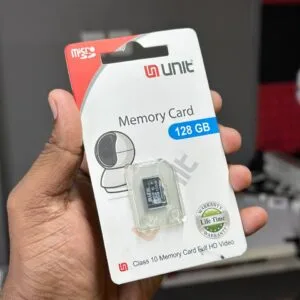
UNIT 128GB Memory Card Class 10 Memory Card Full HD Video
Original price was: ৳ 2,380.৳ 1,830Current price is: ৳ 1,830.-20%
100 in stock

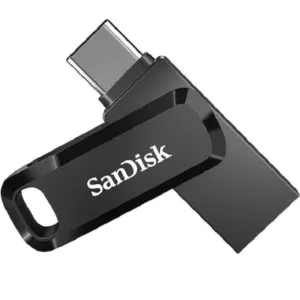
SanDisk Ultra Dual Drive Go USB Type-C Flash Drive-64GB
Original price was: ৳ 1,040.৳ 830Current price is: ৳ 830.-23%
48 in stock
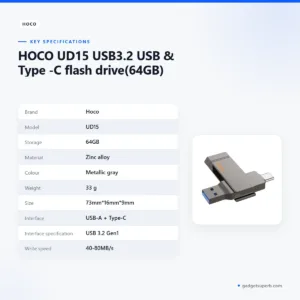

HOCO UD15 USB3.2 USB & Type -C flash drive(64GB)
Original price was: ৳ 2,100.৳ 1,610Current price is: ৳ 1,610. Lexar JumpDrive Dual Drive D40...
 Price range: ৳ 1,730 through ৳ 2,820
Reviews
There are no reviews yet.