No products in the cart.

-28%
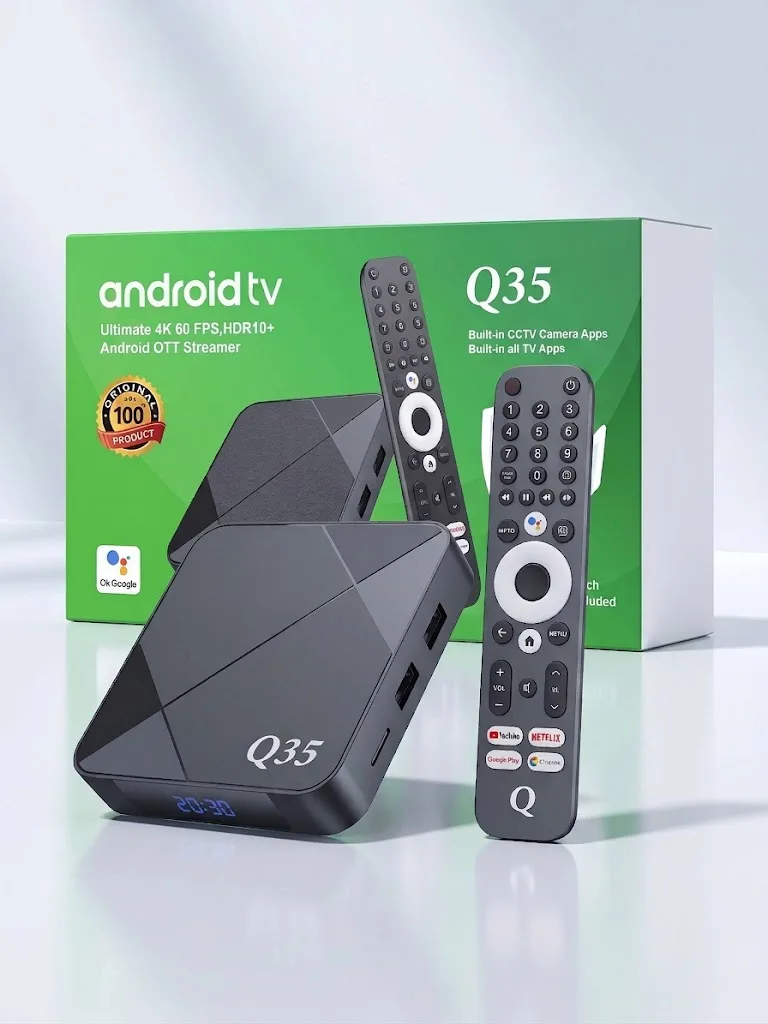


The Q35 Android TV Box is a 4K/8K Android OTT streamer that turns a standard television or monitor into a smart entertainment hub. It suits Bangladeshi households that want apps, streaming and home CCTV viewing on one screen. This guide covers the listed specifications, setup, compatibility, delivery and warranty, so you can decide before you order.
- Overview
- Key features
- Specifications
- How to use and set up
- Compatibility and what is in the box
- Who should buy it in Bangladesh
- Alternatives in our store
- Warranty and support
- Delivery, returns and ordering
- Frequently asked questions
Q35 Android TV Box overview
According to the listing, the Q35 Android TV Box is powered by an Allwinner H618 Quad-Core ARM Cortex-A53 processor with a Mali-G31 MP2 GPU. The maker lists 2GB RAM and 16GB storage, and says the combination delivers smooth navigation, fast app loading and reliable performance. For a Dhaka household that already watches YouTube or Netflix on a phone, the Q35 Android TV Box moves that viewing to the bigger screen in the living room.
The listing presents the Q35 Android TV Box as a single device for three jobs: streaming from popular apps, a Google TV interface with Chromecast built in, and CCTV monitoring through supported camera apps. The setup steps in the listing begin with connecting the box to the television through its HDMI port. That makes the Q35 Android TV Box a practical choice for a flat where one screen serves the whole family.
Load-shedding is a daily reality for many homes, and the Q35 Android TV Box is only useful while the television and router have power. The listing does not mention battery backup or how the box behaves during a power cut, so treat that point as unknown. If you plan to rely on the Q35 Android TV Box for CCTV viewing, check your router and camera setup before you depend on it every day.
Think of the Q35 Android TV Box as one product with a few listed strengths and a few open questions. The product listing names the brand and model as Q35 and places the item in the TV Boxes category of our store. The listing is the source for every specification on this page. The sections below separate listed facts from general buying advice, so you can see which points come from the maker and which come from our guidance.
Key features
Allwinner H618 processor and Mali-G31 GPU
The Q35 Android TV Box uses an Allwinner H618 Quad-Core ARM Cortex-A53 CPU with an ARM Mali-G31 MP2 GPU, according to the listing. The maker says this pairing supports smooth navigation and fast app loading. For everyday use, menus, app launches and browsing are the tasks to watch when you judge the box. The listing does not give benchmark results, so treat the processor as one part of the overall picture. A buyer who mainly opens a few streaming apps on the Q35 Android TV Box is aiming at that routine.
4K @ 60 FPS, HDR10+ and 8K decoding
The listing says the Q35 Android TV Box plays 4K @ 60 FPS video and supports HDR10+. It also lists 8K HDR capable decoding. For most viewers the 4K line is the main point to check, because it describes the picture quality you can expect from the box. Compare the resolution of your own television with the listed figures before you order. The listing does not say which television models match every listed format, so that match is your decision to make.
Dolby Vision and Dolby Atmos support
The listing says the Q35 Android TV Box supports Dolby Vision and Dolby Atmos. The maker lists both formats under audio and video technology. According to the listing, movies and series come to life with rich colours and immersive sound. Whether your television or sound system uses these formats is a separate question, and the listing does not cover it. If you already own a soundbar, check its listed specifications against your setup. Evening movie nights are where this section matters most to families who share one screen.
Dual-band Wi-Fi 6 and Bluetooth 5.4
The Q35 Android TV Box is listed with dual-band Wi-Fi covering 2.4GHz and 5.8GHz, with Wi-Fi 6 support. Bluetooth is listed as version 5.4. According to the listing, this combination supports uninterrupted streaming, fast download speeds and seamless pairing with wireless gamepads, headphones or soundbars. In a Dhaka flat with several phones and laptops on one router, the network often matters as much as the box, so place the router sensibly. Check that any gamepad, headphones or soundbar you plan to pair with the Q35 Android TV Box supports Bluetooth before you buy it.
Built-in CCTV camera app support
The listing says the Q35 Android TV Box has built-in support for popular CCTV camera apps: DMSS, Hik-Connect, Imou Life, EZVIZ and V380 Pro. According to the listing, this allows real-time home or office surveillance straight from the TV screen. If you are new to network cameras, read the IP camera background to understand how they connect to your network. The listing names the apps but not the camera brands or models they work with, so confirm your camera model and app before you order. Keep your camera app and router settings up to date for a steadier connection.
Voice remote, Google TV and Chromecast built in
The listing describes a voice remote with Google Voice Assistant search, and a built-in Google Assistant remote in the specification table. The Q35 Android TV Box runs a Google TV interface and has Chromecast built in, according to the listing. The pre-loaded apps named by the maker are YouTube, Netflix, Toffee, Cricfy, HD Streamz, OTT Bangla and FalconCast. Streaming services usually require your own accounts, and those subscriptions are separate from the box. Use the voice remote to search for shows by name once the apps are installed and signed in.
Specifications
Here are the Q35 Android TV Box specifications as the listing gives them.
| Model | Q35 Android TV Box |
| Operating System | Android / Google TV |
| CPU | Allwinner H618 Quad-Core ARM Cortex-A53 |
| GPU | ARM Mali-G31 MP2 |
| RAM | 2GB DDR3 |
| Storage (ROM) | 16GB eMMC |
| Wi-Fi | Dual Band 2.4GHz + 5.8GHz (Wi-Fi 6) |
| Bluetooth | Version 5.4 |
| Video Resolution | 4K @ 60 FPS, HDR10+, 8K Decoding |
| Audio & Video Tech | Dolby Vision, Dolby Atmos |
| Voice Search | Yes, Built-in Google Assistant Remote |
| Casting | Chromecast Built-in |
| Pre-loaded Apps | YouTube, Netflix, Toffee, Cricfy, HD Streamz, OTT Bangla, FalconCast |
| Supported CCTV Apps | DMSS, Hik-Connect, Imou Life, EZVIZ, V380 Pro |
These are the listed specifications from the product listing for the Q35 Android TV Box.
If you compare sheets from different sellers, check that the listed RAM, storage and video lines match exactly. Small wording differences can change how a product is described, so read each row carefully before you decide. Keep a copy of the table with your order notes if you want to check it later.
How to use and set up
Setup for the Q35 Android TV Box follows the three steps given in the listing. Work through them in order, and keep your Wi-Fi details to hand.
- Connect the box to the television through the HDMI port.
- Connect the box to Wi-Fi or your internet connection.
- Start streaming your favourite shows.
Before you begin with the Q35 Android TV Box, check that your television has a free HDMI port and that the power adapter can reach a socket you can use easily. Follow the maker’s instructions for connecting the power and for pairing the voice remote. Do not force any cable into a port, and keep cables and the power adapter clear of damp surfaces.
A stable connection matters for streaming. The listing says the dual-band Wi-Fi supports uninterrupted streaming, but speed in your home depends on your internet plan, your router and where the box sits, which the listing does not cover. Put the Q35 Android TV Box near the router if you can, and keep it in a ventilated spot away from direct heat and moisture, which matter during Bangladesh’s humid months.
Care and storage are simple. Wipe the outer casing with a dry, soft cloth when the box is switched off and unplugged. Keep it on a shelf or stand with space around it rather than inside a closed cabinet, and avoid stacking heavy items on top. Store the voice remote in a fixed place so it does not get lost between cushions.
Once the Q35 Android TV Box is connected, open the apps you use and sign in with your own accounts. Subscription fees for streaming services are separate from the box. If the picture or sound does not suit your television, check the listed video and audio formats against your screen and sound system before you change any other setting.
Power cuts are common in many parts of Dhaka and other cities. When the supply returns, let the box start up fully and check the Wi-Fi connection before you open a streaming app. If you use a surge protector for the television, router and box, follow the instructions that come with it. The listing does not describe how the box restarts after a cut, so watch for any change in behaviour and note it.
A simple first-day routine helps. Connect the box, complete the Wi-Fi step, sign in to the apps you use, and then play one title from your own subscription to see how the picture and sound look on your screen. Repeat the check after any change to your television settings.
Compatibility and what is in the box
According to the listing, the package contents of the Q35 Android TV Box are a Q35 Android TV Box, a voice remote control, an HDMI cable (HD cable) and a power adapter or cable. This is the only package information on this page, and it comes from the maker’s listing.
Confirmed by the listing: the Q35 Android TV Box supports DMSS, Hik-Connect, Imou Life, EZVIZ and V380 Pro camera apps, has Chromecast built in, uses a Google Assistant voice remote, connects to a television through HDMI, and is described by the maker as suitable for any standard television or monitor.
Not confirmed by the listing: which television or monitor models give the full range of listed video formats, which camera brands and models each app supports, and whether any app beyond the listed pre-loaded ones is available. Confirm your camera model before you order the Q35 Android TV Box, and ask us if you need more detail.
Who should buy it in Bangladesh
The Q35 Android TV Box fits some households better than others. The scenarios below show where it is a practical fit and where it may not be.
Families on a shared screen are the clearest match. If the main goal is streaming YouTube, Netflix or Toffee on the living room television, the Q35 Android TV Box is built around that job. Several viewers can share one connected box rather than passing a phone around the room.
Older televisions with a free HDMI port are another good fit. The listing describes the connection as HDMI to the television, so an older set with that port can take the Q35 Android TV Box. The listing does not state the resolution of your screen, so match your television’s own specification sheet to the 4K @ 60 FPS figure before you decide.
Dhaka households dealing with load-shedding should plan for power cuts. The Q35 Android TV Box needs power in the same way as the television and router. The listing does not mention battery backup, so if daily viewing matters to you, think about a power solution for the television, router and box together.
Home and small-office viewers who want to check a camera on the TV screen will find the CCTV section useful. The listing names five camera apps for the Q35 Android TV Box, so have your camera brand and app name ready when you ask us about compatibility.
Renters who move house often may find the Q35 Android TV Box easy to reuse. Setup depends on one HDMI connection, the power adapter and your Wi-Fi network, so the same setup can be repeated in a new flat once the new television and internet are ready.
Viewers who follow particular apps should read the list first. OTT Bangla and Toffee are among the pre-loaded apps named by the maker, and Cricfy is listed too. Check whether those names suit your viewing habits before you order, because the listing does not describe what each app offers.
Some buyers should look elsewhere. If you need a specific app that is not in the pre-loaded list, ask us first, because the listing names only the apps shown on this page. If you want a different processor or memory size, the alternatives below may suit you better.
Alternatives in our store
Compare the Q35 Android TV Box with Android TV Box- MXQ Pro 4K Internet TV (1GB, 8GB), another Android TV box in our range. You can also look at TX20 Pro 12K Ultra HD Smart Android TV Box, a TV box in our range, or Q5 Android tv box 4k 2GB ram 8GB Storage Voice Remote IPTV compatible, another TV box in our range. For a further option, see TX60 Pro 24K Ultra HD Smart Android TV Box with Voice Control Remote, which is also a TV box in our range. Browse the full TV boxes category to compare them side by side.
Warranty and support
Warranty: 1 Year seller warranty.
Delivery, returns and ordering
We deliver all over Bangladesh and you pay cash on delivery. Delivery usually takes 1–3 days inside Dhaka city and 2–5 days outside Dhaka. You can return it within 7 days of delivery (see our Delivery & Returns policy). Questions before ordering: call 09638054751, message us on Facebook Messenger or email care@gadgetsuperb.com.
If you order the Q35 Android TV Box for a home inside Dhaka city, the 1–3 day window applies. For a home outside Dhaka, plan for the 2–5 day window. Read the policy page before you place your order.
Before you order, write down your television’s HDMI situation, your router details and the camera brand you want to view. Having these details ready makes it easier to ask us about fit before you commit to the Q35 Android TV Box. Keep your delivery address and a contact number ready as well.
Frequently asked questions
What is the Q35 Android TV Box?
The Q35 Android TV Box is a 4K/8K Android OTT streamer that turns a standard television or monitor into a smart entertainment hub, according to the listing. It runs Android / Google TV and is sold in our TV Boxes category.
Does it support 4K streaming?
Yes, the listing says the box plays 4K @ 60 FPS with HDR10+, and lists 8K decoding too. Check the resolution of your television before you order.
Can it be used for CCTV monitoring?
Yes, the listing says the box has built-in support for DMSS, Hik-Connect, Imou Life, EZVIZ and V380 Pro camera apps. It allows real-time home or office surveillance from the TV screen, according to the listing.
Does it come with a voice remote?
Yes, the listing describes a voice remote with built-in Google Assistant search. A Google TV interface and Chromecast built in are also listed.
How much RAM and storage does it have?
The listing gives 2GB DDR3 RAM and 16GB eMMC storage for this model. These are the memory figures the maker lists.
Which apps are pre-loaded?
According to the listing, the pre-loaded apps are YouTube, Netflix, Toffee, Cricfy, HD Streamz, OTT Bangla and FalconCast. Streaming subscriptions are separate from the box.
Does it support Wi-Fi 6?
Yes, the listing gives dual-band Wi-Fi at 2.4GHz and 5.8GHz with Wi-Fi 6 support. Bluetooth is listed as version 5.4.
Is there a warranty?
Yes, the warranty value we list is 1 Year seller warranty, shown in the Warranty and support section of this page.
Can I return it after delivery?
Yes, you can return it within 7 days of delivery, as set out in our Delivery & Returns policy. Read the policy before you place your order.
Do you deliver outside Dhaka?
Yes, we deliver all over Bangladesh and you pay cash on delivery. Delivery usually takes 2–5 days outside Dhaka.
Can I ask questions before ordering?
Yes, call 09638054751, message us on Facebook Messenger or email care@gadgetsuperb.com. We are glad to answer questions before you place an order.
Does it need a television with an HDMI port?
Yes, the listing describes the connection to the television through the HDMI port, so a set without one is not covered by the listing. Ask us before you order if your television has no HDMI port.
Is an HDMI cable included?
According to the listing, the package includes an HDMI cable (HD cable) and a power adapter or cable. Check the listing before you order if you need the exact package details.
Related products
-25%
65 in stock

TX60 Pro 24K Ultra HD Smart Android TV Box with Voice Control Remote
Original price was: ৳ 3,350.৳ 2,480Current price is: ৳ 2,480.-25%
50 in stock


Q5 Android tv box 4k 2GB ram 8GB Storage Voice Remote IPTV compatible
Original price was: ৳ 3,740.৳ 2,770Current price is: ৳ 2,770.-25%
50 in stock


TX20 Pro 12K Ultra HD Smart Android TV Box
Original price was: ৳ 3,350.৳ 2,480Current price is: ৳ 2,480.-26%
50 in stock


Android TV Box- MXQ Pro 4K Internet TV (1GB, 8GB)
Original price was: ৳ 2,800.৳ 2,070Current price is: ৳ 2,070. Q35 4K/8K Android OTT Streamer...
Original price was: ৳ 6,080.৳ 4,370Current price is: ৳ 4,370.
50 in stock
Reviews
There are no reviews yet.