No products in the cart.

-28%


The Meari S2 Plus camera is an outdoor smart PTZ WiFi camera that the maker lists for reliable 24/7 outdoor monitoring, aimed at households, shopkeepers and small offices in Bangladesh that want to watch a gate, a garden, a shopfront or a yard. It combines 4MP video, pan and tilt control and two-way audio in one unit.
- Overview
- Key features
- Specifications
- How to use and set up
- Compatibility and what is in the box
- Who should buy it in Bangladesh
- Alternatives in our store
- Warranty and support
- Delivery, returns and ordering
- Frequently asked questions
Meari S2 Plus camera overview
The Meari S2 Plus camera is listed as a high-resolution surveillance solution designed for reliable 24/7 outdoor monitoring. According to the listing, it features advanced motion detection, auto-tracking and two-way audio, and these together give comprehensive security coverage with flexible installation options and dual-band WiFi connectivity. For a buyer in Bangladesh, the practical questions are whether the mounting spot, the power supply and the WiFi signal at your property suit the Meari S2 Plus camera. This page takes those checks one step at a time.
The Meari S2 Plus camera is a PTZ model, which the listing describes as an outdoor smart PTZ WiFi camera. The listing gives a horizontal pan of 0° to 355° and a vertical tilt of 0° to -90°. It pairs these with a 95° viewing angle from a 3.6mm lens, and the listing says this combination provides full-area coverage. That suits a gate, a garden side or a parking space seen from one mounting point, which is a common need for homes and small businesses in Dhaka and other cities.
The field of view of the Meari S2 Plus camera depends on where you fix it, so check the spot at your intended mounting height first. The camera has dual-band WiFi at 2.4GHz and 5GHz and an RJ45 Ethernet port, which the listing presents as flexible installation options. Many homes in Bangladesh have WiFi that weakens toward outer rooms, so a wired connection may suit a fixed spot better. Load-shedding can interrupt any camera that depends on a power adapter, so plan how the Meari S2 Plus camera will keep recording during outages.
Key features
4MP video for clear identification
The listing gives the resolution of the Meari S2 Plus camera as 4MP (2560×1440) at 20 fps, and describes the result as sharp and detailed video. It also says high-definition video ensures clear identification of people and objects. For a property in Bangladesh, that difference matters at a gate, an entrance or a shop front, where you need to recognise a person rather than only notice movement. Compression is listed as H.265 and H.264. The listing does not say how much footage a card holds at this resolution, so estimate your recording needs before you choose a MicroSD card for the Meari S2 Plus camera.
Pan, tilt and a 95° viewing angle
The listing gives a horizontal pan range of 0° to 355° and a vertical tilt range of 0° to -90° for the Meari S2 Plus camera. It pairs this with a 95° viewing angle and a 3.6mm lens, which the listing describes as a wide-angle lens with PTZ control for full-area coverage. The listing also names a limited vertical tilt range, with -90° as the maximum, among its cons, so plan the mounting height and angle around that limit. When you position the Meari S2 Plus camera, mark the main zones you want to see, then check whether the pan and tilt limits reach each one.
Night vision in two modes
According to the listing, the Meari S2 Plus camera offers infrared night vision up to 30m and colour LED night vision up to 20m. The listing names dual night vision modes as one of its pros, and says the camera gives reliable performance in low-light and harsh weather conditions. The listing gives no lux figures and no colour performance numbers, so judge the night picture from your own site rather than from a spec sheet. Dark corners near a gate or a parked vehicle are good places to test the Meari S2 Plus camera first.
Two-way audio and siren alert
On the Meari S2 Plus camera, the listing describes a built-in microphone and speaker for two-way communication, which it presents as real-time interaction. A built-in siren is also listed for real-time alerts. For a shop or small office, two-way audio may let staff speak to someone at the entrance without going outside, while the siren adds an audible alert. The listing does not say how far the audio carries or how loud the siren is, so those details are not confirmed by the listing.
Smart detection and auto-tracking
The listing names motion detection, auto-tracking, sound detection, human body recognition and siren alert as smart features of the Meari S2 Plus camera. It describes auto-tracking and smart alerts as tools that enhance security response. The listing’s pros also include advanced smart detection features. It does not say how the tracking performs with several people in view, so check that behaviour in your own setting. A home beside a busy road may receive frequent motion alerts from passing traffic, so adjust the mounting angle of the Meari S2 Plus camera to reduce them.
MicroSD storage and IP66 outdoor build
The Meari S2 Plus camera has a MicroSD card slot that the listing says supports up to 256GB. The listing also says local storage requires a MicroSD card purchase, and it does not mention a cloud storage option. On the protection side, the listing gives IP66 water and dust resistance and describes the camera as IP66-rated for outdoor durability. Humid weather is common in Bangladesh, so keep that listed rating in mind when you choose an exposed spot for the Meari S2 Plus camera, and follow the maker’s instructions on mounting.
Specifications
The table below sets out the specifications of the Meari S2 Plus camera as the product listing gives them. Use it to check the resolution, connectivity and storage of the Meari S2 Plus camera against your site needs.
| Model | Meari S2 Plus |
|---|---|
| Type | Outdoor Smart PTZ WiFi Camera |
| Resolution | 4MP (2560×1440) @ 20 fps |
| Compression | H.265 / H.264 |
| Connectivity | Dual-band WiFi (2.4GHz & 5GHz), RJ45 Ethernet |
| Lens | 3.6mm |
| Viewing angle | 95° |
| Pan/Tilt | Horizontal 0°~355°, Vertical 0°~-90° |
| Night vision | Infrared up to 30m, Color LED up to 20m |
| Audio | Built-in microphone and speaker for two-way communication |
| Storage | MicroSD card slot, supports up to 256GB |
| Protection | IP66 water and dust resistance |
| Smart features | Motion detection, auto-tracking, sound detection, human body recognition, siren alert |
| Compatibility | Vietnamese server support |
These are listed specifications from the product listing.
How to use and set up
Start by reading the maker’s instructions and the user manual, which the listing includes. Follow the maker’s instructions for mounting, power and connection in full before you start. Setting up the Meari S2 Plus camera is simpler when you have the mounting kit, the power adapter and a clear plan for the spot in front of you. For background on the technology, see what an IP camera is.
Choose the mounting point first. Look for a solid surface, a power point within reach of the adapter and a view of the area you want to cover. Before you fix the bracket, check the WiFi signal at that spot with your phone, because the listing does not give a range figure. If the signal is weak, the Ethernet port on the Meari S2 Plus camera offers a wired route for a fixed position.
If you want recordings kept locally, insert a MicroSD card. The listing says the slot supports up to 256GB and that local storage needs a card. Once the card is in, follow the maker’s instructions to prepare it for recording. Choose a size that suits how long you want to keep footage from the Meari S2 Plus camera, and remember that the listing does not give a recording time. Keep the card seated and the slot dry, and store spare cards in a cool, dry place away from direct sun.
Connect the camera using the method the maker’s instructions describe, then confirm the live picture from another device on the same network. Check the view in daylight and again after dark. Adjust the pan and tilt within the listed range, from 0° to 355° horizontally and 0° to -90° vertically, until the Meari S2 Plus camera covers the zone you marked. Note the final settings once you are happy with them, so you can restore them after the camera has been moved or cleaned.
Care for the camera is simple. Wipe the lens with a soft, dry cloth and avoid harsh chemicals. Check the mounting and cable connections every few months, especially after heavy storms or during the monsoon, when wind and rain can loosen fixings. Trim vegetation that blocks the view, and check the cable entry for moisture or insects. Keep spare cables and your order papers together in one place.
Plan power before the day of installation. Because load-shedding can cut supply, ask your installer whether surge protection and an extension suit your wiring, and follow the maker’s instructions for the power adapter. The listing does not describe a battery backup, so treat backup power as a question to settle before you buy.
A simple checklist helps. Before you start, confirm the spot, the power point, the WiFi strength or cable route, the MicroSD card and the phone or computer you will use to view the picture. After setup, check the picture by day and by night, adjust the angle, then note the settings. Working in this order saves time, especially on a hot afternoon when a ladder is hard work.
Compatibility and what is in the box
The Meari S2 Plus camera is listed as compatible with Vietnamese servers. The listing does not explain what that means for a buyer in Bangladesh, so this point is not confirmed by the listing. If you plan to rely on a particular server or service, ask us before you order rather than assume it will work at your site.
According to the listing, the package includes one Meari S2 Plus camera, one power adapter, one mounting kit, one user manual and one warranty card. The listing does not name any optional accessories, so if you need extra cable or a MicroSD card, plan to buy those separately.
Connectivity is listed as dual-band WiFi at 2.4GHz and 5GHz, plus RJ45 Ethernet. The listing gives the Ethernet port as 10/100M. These are the connection options the listing states for the camera, and it lists no other connection types. Check how your router names its bands before setup, and confirm that the router is within reach of the mounting spot.
Who should buy it in Bangladesh
The Meari S2 Plus camera suits buyers who want outdoor monitoring with a camera that can pan and tilt. A homeowner in Dhaka with a gate, a small garden or a rooftop entrance may find the pan and tilt range useful. A family in a flat with a balcony should check whether the balcony view suits the listed 95° viewing angle before buying the Meari S2 Plus camera.
A shop owner in a busy market could use the Meari S2 Plus camera to watch the shopfront while staff are inside. Two-way audio lets staff speak to someone at the door, which the listing presents as real-time communication. Smart alerts can help you respond after hours, as the listing describes its alerts as enhancing security response. For a stall in a crowded lane, check that the mounting spot leaves the view clear of signboards and passers-by.
A small office, warehouse or store yard can use the Meari S2 Plus camera for 24/7 outdoor monitoring. Auto-tracking and motion alerts suit a site where you want notice of movement at night. Plan the power point and WiFi signal before installation, so the camera is not left without power or signal when you need it most. A warehouse with high humidity may need a more careful mounting plan than a dry room.
Families who travel often can use the camera to check a home while they are away. Two-way audio may help when a family member needs to speak to a visitor at the gate, and the listed siren can add a sound warning. Keep the contact details of your installer and of our team close at hand.
Households in areas with frequent load-shedding should plan power continuity before buying. The listing mentions a power adapter but no battery, so a backup supply is a question to settle with your installer. Bangladesh’s monsoon season brings long wet spells and high humidity, so plan the mounting spot with rain and damp air in mind. The IP66 rating for water and dust resistance is the only protection detail the listing gives, so read it as the maker’s statement rather than a guarantee for every site.
Renters should ask the landlord before fixing a bracket to a wall, and choose a spot that can be removed without damage. A rented shop with a weak signal may suit the Ethernet connection, if a cable route is possible. Think about the view from the ground floor as well as the first floor, because a fixed mounting point covers a fixed area.
The Meari S2 Plus camera may not suit everyone. If you need cloud storage, the listing does not mention an option for it. If you want a camera with a fixed view and no pan or tilt movement, compare the fixed models in our range before deciding.
Alternatives in our store
If the Meari S2 Plus camera is not the right fit, compare it with other security cameras in our range before you order. You can look at V380 WiFi Dual Lens Security Smart IP Camera, another security camera in our range. You may also consider V380 PRO E27 360 Degree 1080P Wireless Home Security IP Camera, also a security camera in our range. Other options include Dual Lens V380 Pro PTZ Bulb IP Night Vision Camera, another security camera, and V380 E9 Dual Lens Bulb PTZ IP Camera, also a security camera in our range. Browse the full Security Cameras category to compare every option.
Choosing between models usually comes down to mounting position, power and how you plan to store recordings. Compare each option against the specifications above, then choose the one that fits your site.
Warranty and support
Warranty: 7 Days seller warranty.
Delivery, returns and ordering
We deliver all over Bangladesh and you pay cash on delivery.
Delivery usually takes 1–3 days inside Dhaka city and 2–5 days outside Dhaka. Plan your installation date around that window, and keep a suitable power point and mounting spot ready before the camera arrives.
You can return it within 7 days of delivery (see our Delivery & Returns policy). Read that page before you order so you know the full terms.
Questions before ordering: call 09638054751, message us on Facebook Messenger or email care@gadgetsuperb.com.
When you order, check that the model name matches the camera you want, and keep your order reference for any follow-up. Ask our team about any listed specification before you pay on delivery, so the order matches your site.
Frequently asked questions
What is the Meari S2 Plus camera?
It is listed as a high-resolution outdoor smart PTZ WiFi camera designed for reliable 24/7 outdoor monitoring.
Is the Meari S2 Plus camera suitable for outdoor use?
The listing describes it as IP66-rated for outdoor durability, with IP66 water and dust resistance. It is also listed with infrared and colour LED night vision.
Does the Meari S2 Plus camera have night vision?
Yes. The listing gives infrared night vision up to 30m and colour LED night vision up to 20m.
How much storage does the camera support?
The listing says the MicroSD card slot supports up to 256GB, and that local storage requires a MicroSD card purchase.
Does the Meari S2 Plus camera have two-way audio?
Yes. The listing gives a built-in microphone and speaker for two-way communication, plus a built-in siren for real-time alerts.
Does the Meari S2 Plus camera support cloud storage?
The listing does not mention a cloud storage option, so ask our team before you choose a storage plan.
What is the warranty on the Meari S2 Plus camera?
Warranty: 7 Days seller warranty.
Can I pay cash on delivery for this camera?
Yes. We deliver all over Bangladesh and you pay cash on delivery.
How long does delivery take?
Delivery usually takes 1–3 days inside Dhaka city and 2–5 days outside Dhaka.
Can I return it?
You can return it within 7 days of delivery. See our Delivery & Returns policy for the full terms.
What are the pan and tilt limits?
The listing gives a horizontal pan of 0° to 355° and a vertical tilt of 0° to -90°.
Does it connect over WiFi or a cable?
The listing gives dual-band WiFi at 2.4GHz and 5GHz, plus RJ45 Ethernet at 10/100M.
Related products
-26%
31 in stock
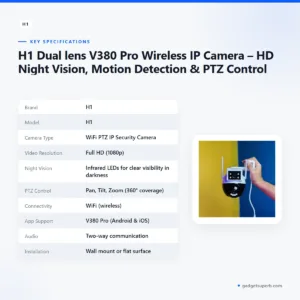
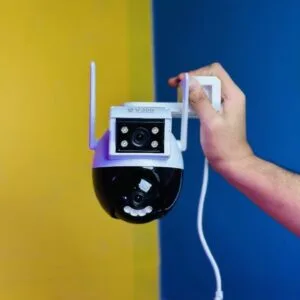
H1 Dual lens V380 Pro Wireless IP Camera – HD Night Vision, Motion Detection & PTZ Control
Original price was: ৳ 3,990.৳ 2,950Current price is: ৳ 2,950.-27%
45 in stock
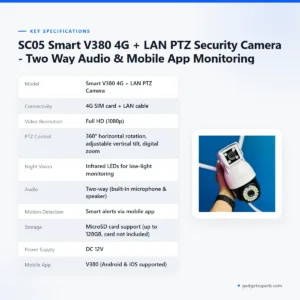

SC05 Smart V380 4G + LAN PTZ Security Camera – Two Way Audio & Mobile App Monitoring
Original price was: ৳ 4,530.৳ 3,300Current price is: ৳ 3,300.-28%
32 in stock


V380 PRO 3 Lens CCTV Outdoor Waterproof Night Vision PTZ Camera (4G+LAN)
Original price was: ৳ 6,550.৳ 4,710Current price is: ৳ 4,710.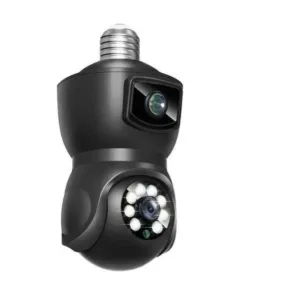
-23%
70 in stock

Dual Lens V380 Pro PTZ Bulb IP Night Vision Camera
Original price was: ৳ 2,460.৳ 1,890Current price is: ৳ 1,890. Meari S2 Plus 4MP Outdoor Smar...
 Original price was: ৳ 7,360.৳ 5,290Current price is: ৳ 5,290.
47 in stock
Reviews
There are no reviews yet.