No products in the cart.

-23%


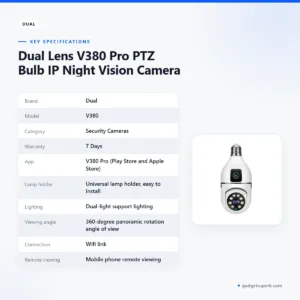

The dual v380 camera is a Dual brand PTZ bulb IP night vision camera for Bangladeshi homes, flats and small shops that want to check a room from a phone. The listing describes a universal lamp holder, a 360-degree panoramic rotation angle and mobile phone remote viewing over a wifi link.
- Overview of the dual v380 camera
- Key features
- Specifications
- How to use / set up
- Compatibility and what is in the box
- Who should buy it in Bangladesh
- Alternatives in our store
- Warranty and support
- Delivery, returns and ordering
- Frequently asked questions
Overview of the dual v380 camera
Our listing for the dual v380 camera describes it as a PTZ bulb IP night vision camera from the Dual brand, in the Security Cameras category. The product name points to two things buyers usually ask about first: a bulb-style design and night vision. The listing names a universal lamp holder that is listed as easy to install, so checking the fitting in your room is the first practical step before you buy.
The listing also names the V380 Pro app, available on Play Store and Apple Store. According to the listing, you can use mobile phone remote viewing over a wifi link, and the dual v380 camera offers real-time intelligent two-way voice intercom. For a home or small office, that means you can see the room and speak to whoever is there from the same phone.
For background on the wider technology, read the entry on what an IP camera is on Wikipedia. Many Bangladeshi buyers also ask how a camera copes with power cuts. The listing does not describe that, so plan a stable power supply, and ask us before you order if it matters for your site. A dual v380 camera is most useful when it has a clear job, such as watching a door, a counter or a child’s room.
Choosing a camera for a Bangladeshi home or shop starts with the room. Think about where the power comes from, how the light fitting sits, and who will check the view on a phone. A dual v380 camera suits a single area that you want to watch from anywhere with a connection, and it can be turned to cover more of that area. Compare it with the alternatives in our range before you decide.
Key features
Universal lamp holder
The listing describes the lamp holder as universal and says it is easy to install. For a bulb-style camera, that is the first detail to check. The listing does not give fitting sizes or holder types, so compare the fitting your ceiling or wall light uses before you order. If you want help matching it, message us on Facebook Messenger with a clear photo of the fitting. If you rent a flat in Dhaka, ask your landlord whether a change of light fitting is allowed before you install the dual v380 camera, and ask an electrician to confirm the fit if you are unsure.
Dual-light support lighting
The listing says the camera has dual-light support lighting. It does not describe how bright the lights are or when they switch on, so do not assume a particular night-time view from the name alone. In a Bangladeshi home or shop, a camera with night vision can help in a dim corridor, a stairwell or a back room where daylight does not reach. Once the dual v380 camera is set up, check the view at the time of day you care about most, then adjust the angle until the area you want is clear. Load-shedding can cut the power without much warning, so note which hours matter most for your own viewing. Repeat the check after a few days to confirm the view still suits the room.
360-degree panoramic rotation
According to the listing, the camera offers a 360-degree panoramic rotation angle of view. For a dual v380 camera set in one spot, think first about which part of the room matters most, such as a doorway, a cash box or a child’s play corner. The listing does not say how far the camera tilts up or down, or how quickly it turns, so keep your expectations to what the listing states. Walk through the room with the phone view before you fix the mount, and make sure the chosen area stays in frame. Placement matters more than any single feature on the list, so take your time over it.
Mobile phone remote viewing and Wi-Fi link
The listing states mobile phone remote viewing and a wifi link for the dual v380 camera. In practice, that means the camera connects to your home network, and you can check the view from your phone when you are away. The listing names the V380 Pro app for the Play Store and the Apple Store, so search for that name when you start. Remote viewing may suit a shop owner in Chattogram who wants to check the counter at lunch, or a parent in Dhaka who wants to see the front door during the working day. The listing does not give connection figures, so test the view on your own connection and keep the camera within easy reach of your router during setup.
Two-way voice intercom and resolution
The listing describes a real-time intelligent two-way voice intercom and 2 million high-definition pixels. Two-way audio lets you speak to someone near the camera, which may help with a delivery at the gate or a family member at home. The listing does not state audio quality or any recording setting, so use the figure as the maker lists it. When you want a clear view of faces or documents, test the picture at the distance you actually need. Everyone at home should know when the intercom is in use, and the same courtesy applies to any dual v380 camera in a shared space.
Memory card and storage options
The listing names cloud storage and TF card storage, and says the camera supports a 64G memory card. The listing does not say which storage option needs a subscription, what the cloud limits are or which card brands are recommended. If storage is part of your decision, ask us about the options for the dual v380 camera before you order. Keep the storage question in mind when you compare the alternatives below, because each product page may list different details.
Specifications
The table below lists the specifications for the dual v380 camera as they appear on the product listing. We have kept the wording close to the listing so you can check each detail before you order.
| Brand | Dual |
|---|---|
| Model | V380 |
| Category | Security Cameras |
| Warranty | 7 Days |
| App | V380 Pro (Play Store and Apple Store) |
| Lamp holder | Universal lamp holder, easy to install |
| Lighting | Dual-light support lighting |
| Viewing angle | 360-degree panoramic rotation angle of view |
| Connection | Wifi link |
| Remote viewing | Mobile phone remote viewing |
| Voice | Real-time intelligent two-way voice intercom |
| Resolution | 2 million high-definition pixels |
| Memory card | Supports 64G memory card |
| Storage | Cloud storage and TF card storage |
These are listed specifications from the product listing.
How to use / set up
Setting up a dual v380 camera is easier when you plan the steps first. Treat the list below as a general route, and follow the maker’s instructions for the exact sequence.
- Read the maker’s instructions and find the V380 Pro app on the Play Store or Apple Store.
- Check the lamp holder fit in the room where you plan to use the camera.
- Charge fully before first use, following the maker’s instructions.
- Install the V380 Pro app on your phone.
- Connect the camera to your Wi-Fi network through the app, following the maker’s instructions.
- Position the camera so the main area is in view, then check the picture at the times that matter to you.
Before you fix anything to a wall or ceiling, decide where your phone will be when you check the view, and make sure the camera can reach the area you want without blocking a door or window. Keep the router and your phone nearby during setup, and move the camera only after the connection is stable.
Care matters for any dual v380 camera. Dust the lens gently with a dry cloth when the view looks hazy, and check that the mount is still secure after a few weeks. Keep the maker’s instructions, your delivery receipt and the warranty details together, so you can find them quickly if you need to return the item within 7 days of delivery.
Compatibility and what is in the box
The listing confirms a universal lamp holder, the V380 Pro app on Play Store and Apple Store, and a wifi link. Those are the compatibility points we can state from the listing for the dual v380 camera.
The listing does not confirm which phone models or operating versions work with the app. Check your phone’s app store page first, and make sure the V380 Pro app is the one named in the listing.
Lamp holder sizes are also not confirmed by the listing, so the fitting check comes first. The listing does not say what the order includes. If you need to know about mounting parts or accessories, ask us before you buy.
Our team can answer your questions by phone on 09638054751, on Facebook Messenger or at care@gadgetsuperb.com.
Who should buy it in Bangladesh
A dual v380 camera suits buyers who want a simple, phone-based view of one area rather than a full installed system. The scenarios below show where it can fit, and where it may not.
A flat owner in Dhaka who works long hours might use the dual v380 camera to check the hallway or the main door from the office. If the flat has a single ceiling light in that spot, the lamp holder check matters most, so measure the fitting first.
A small shop owner in Chattogram or Sylhet could use it to watch the counter from the back room during busy hours. The listed two-way voice intercom may help you speak to a customer who is near the camera, although the listing does not describe the audio range.
A family with children or an elderly relative at home may want to see the room while they are out. Use the intercom with care, and agree with everyone at home how the camera will be used.
A renter who may move house should check the building rules before installing a dual v380 camera, because the listing does not describe mounting in detail. A landlord may also have views on changing a light fitting, so ask first.
A building manager who wants a simple view of a shared corridor may also look at this model, though building rules and the agreement of other residents come first.
If you are still comparing options in our range, read the alternatives section below before you decide.
Alternatives in our store
If the dual v380 camera is not the right fit, these related products are also in our range. Each one sits in our security camera collection, so you can compare the listings before you order.
Browse the Meari S2 Plus 4MP Outdoor Smart PTZ WiFi Camera, which is another option in our security camera range. The V380 WiFi Dual Lens Security Smart IP Camera is another option in the same range. The V380 PRO E27 360 Degree 1080P Wireless Home Security IP Camera is another option for home security, and the V380 E9 Dual Lens Bulb PTZ IP Camera is another option in our range.
For the full set of options, browse the Security Cameras category. Compare the listed details on each page, and ask us if you are unsure which one suits your room.
To choose between these options, start with the place you want to watch and the fitting you already have. Read the listed details on each page side by side, and compare them with what you have seen of the dual v380 camera before you decide.
Warranty and support
Warranty: 7 Days seller warranty.
Delivery, returns and ordering
Before you order the dual v380 camera, here is how delivery and returns work. We deliver all over Bangladesh and you pay cash on delivery. Delivery usually takes 1–3 days inside Dhaka city and 2–5 days outside Dhaka.
You can return it within 7 days of delivery (see our Delivery & Returns policy). The full terms are on that page, and the same return window applies to any dual v380 camera you order from us.
Questions before ordering: call 09638054751, message us on Facebook Messenger or email care@gadgetsuperb.com. Our team can help you check the fitting, app and storage points before you pay on delivery.
If you are ordering for a family member outside Dhaka, allow for the 2–5 day window and plan the installation for the day the parcel arrives. If you are ordering for a shop, keep the delivery details accurate so the parcel reaches the right address within the usual time frame.
Frequently asked questions
What is the dual v380 camera?
The dual v380 camera is a Dual brand PTZ bulb IP night vision camera in our Security Cameras category, according to the listing. The listing also states a universal lamp holder, dual-light support lighting and a 360-degree panoramic rotation angle of view.
Can I view the dual v380 camera on my phone?
Yes, the listing says it supports mobile phone remote viewing over a wifi link. Use the V380 Pro app from the Play Store or the Apple Store, as named in the listing.
Is the dual v380 camera the same as the V380 Pro?
The listing uses the name Dual Lens V380 Pro for this product and names the V380 Pro app, but it does not compare the dual v380 camera with other models. Check the linked product pages before you choose.
What storage options does the dual v380 camera support?
According to the listing, it supports cloud storage and TF card storage, as well as a 64G memory card. The listing does not give cloud limits, so ask us if that matters for your plan.
Which memory card size does the dual v380 camera support?
The listing says the dual v380 camera supports a 64G memory card. It does not say which card brands are recommended, so check with us before you buy a card.
Will the dual v380 camera fit my light fitting?
The listing describes a universal lamp holder that is easy to install, but it does not give fitting sizes. Confirm your fitting before you order, and ask us if you are unsure.
What warranty comes with the dual v380 camera?
Warranty: 7 Days seller warranty.
Do you deliver the dual v380 camera outside Dhaka?
Yes, we deliver all over Bangladesh and you pay cash on delivery. Delivery usually takes 2–5 days outside Dhaka.
Can I return the dual v380 camera?
Yes, you can return it within 7 days of delivery. See our Delivery & Returns policy for the full terms.
Who can I contact before I order the dual v380 camera?
Call 09638054751, message us on Facebook Messenger or email care@gadgetsuperb.com. Our team can answer questions before you order.
Related products
-26%
31 in stock
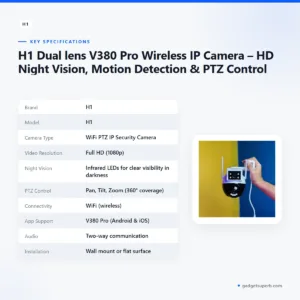
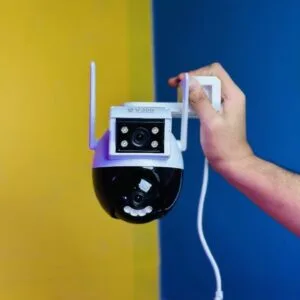
H1 Dual lens V380 Pro Wireless IP Camera – HD Night Vision, Motion Detection & PTZ Control
Original price was: ৳ 3,990.৳ 2,950Current price is: ৳ 2,950.-25%
451 in stock
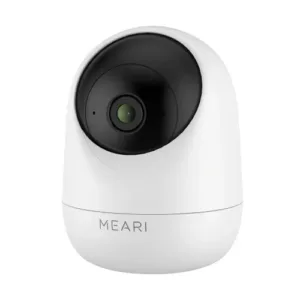
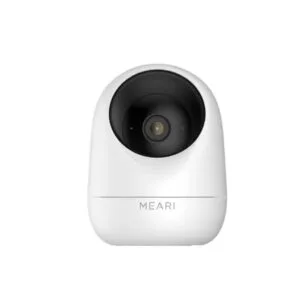
Meari S1 Plus 3MP Indoor Pan/Tilt Portable WiFi Camera
Original price was: ৳ 3,660.৳ 2,710Current price is: ৳ 2,710.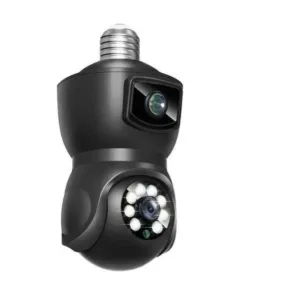
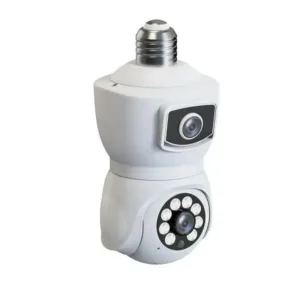
-23%
8 in stock
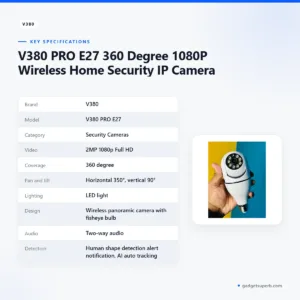
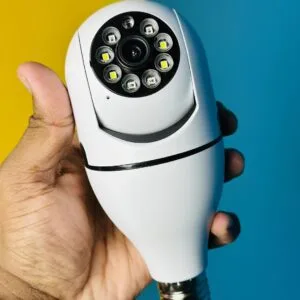
V380 PRO E27 360 Degree 1080P Wireless Home Security IP Camera
Original price was: ৳ 1,770.৳ 1,360Current price is: ৳ 1,360.-27%
50 in stock

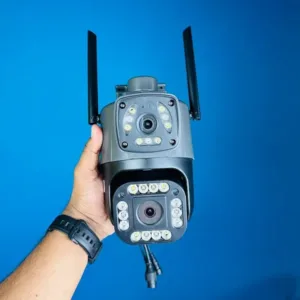
V380 WiFi Dual Lens Security Smart IP Camera
Original price was: ৳ 4,690.৳ 3,420Current price is: ৳ 3,420. Dual Lens V380 Pro PTZ Bulb IP...
 Original price was: ৳ 2,460.৳ 1,890Current price is: ৳ 1,890.
70 in stock
Reviews
There are no reviews yet.