No products in the cart.

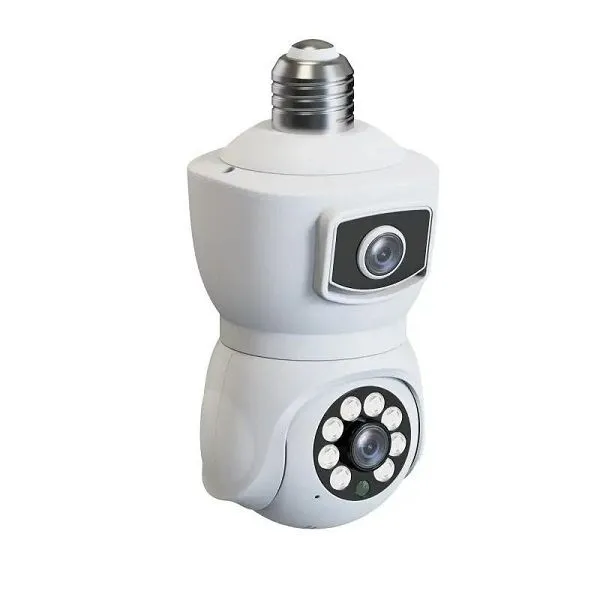
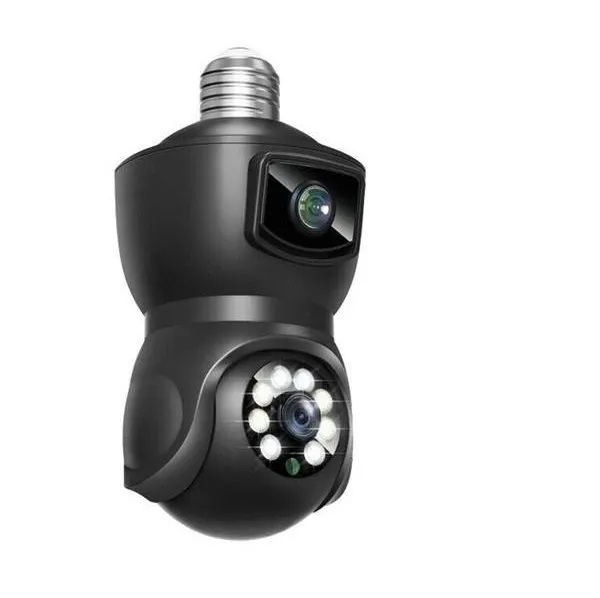


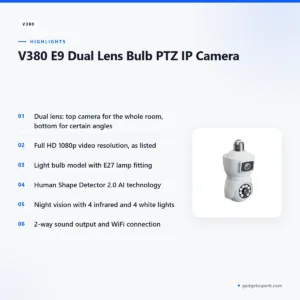

The V380 IP camera is a dual lens bulb PTZ camera for buyers who want a view of a home, garage, car, shop or factory from a standard light fitting. According to the listing, it uses an E27 lamp socket, records Full HD 1080p video and connects over WiFi, so you can watch the feed from a phone, laptop or computer.
- V380 IP camera overview
- Key features
- Specifications
- How to use / set up
- Compatibility and what is in the box
- Who should buy it in Bangladesh
- Alternatives in our store
- Warranty and support
- Delivery, returns and ordering
- Frequently asked questions
V380 IP camera overview
The listing describes this product as the V380 E9 Dual Lens Bulb PTZ IP Camera, so the model name is E9 and the product type is a dual lens bulb PTZ camera. The V380 IP camera uses two lenses. According to the listing, the camera at the top captures the room as a whole, while the bottom camera can be used to watch certain angles. The maker also lists a 360° panorama feature, which the listing presents as a further layer of safety.
For many Bangladeshi households, the appeal of the V380 IP camera is practical. It is built as a light bulb, so it can take the place of an ordinary bulb in a compatible fitting and watch a room from the spot where a light already hangs. The listing says the camera can be installed in homes, garages, cars, shops and factories, and it asks buyers to use an E27 lamp socket. Check your fitting before you order, because the listing names that socket type. For general background on network cameras, read the general background on IP cameras article.
Live viewing is the other half of the V380 IP camera story. The listing describes a WiFi connection with a built-in application, which lets you open the feed on a smartphone, laptop or computer in real time, anywhere and at any time. It also says several users can access the feed at once. Night vision and two-way sound complete the set, but the listing does not name every phone platform or network setup, so follow the maker’s instructions when you connect the camera.
Key features
Dual lens camera
The listing says this camera uses a dual-lens design so that it can monitor the environment well. The top lens captures the room as a whole, which suits a general view of a living room, shop front or storeroom. The bottom lens can be used to watch certain angles, so you can keep a closer eye on a doorway, a corner or a shelf that the main view covers less clearly. The maker lists the 360° panorama feature alongside this design, and the listing describes the pair as a way to make the space safer. Think about where each view should point before you fix the V380 IP camera in its fitting, and walk the room once with the feed open on your phone.
Full HD 1080p video
According to the listing, the V380 IP camera records video at Full HD 1080p resolution, which the maker describes as clear and crisp. The listing says that even though the unit is small in size, it can record high-quality footage suited to watching many kinds of activity in a space. In a Bangladeshi home, that can mean checking a front room, a child’s play corner or a storeroom during the day. Resolution describes the recording, not how every scene will look in every light level, so judge the image in your own room once the camera is in place. Note the listing does not give a frame rate or storage figure, so do not assume one.
Light bulb model with E27 fitting
The listing offers this camera as a bulb model, so it can be placed in homes, garages, cars, shops and factories. According to the listing, the bulb form lets you monitor various angles without being limited by room size. The listing repeats the E27 requirement, so check that your lamp holder matches it before you buy. A bulb-style V380 IP camera can give a shop in Dhaka or a home in Chattogram a flexible position above a counter, a doorway or a parked motorbike, as long as the fitting suits the unit. Ceiling heights and wiring differ from one building to the next, so plan the position with care.
Human Shape Detector 2.0
The listing describes Human Shape Detector 2.0 as AI technology that can detect humans and other objects. According to the listing, this helps the V380 IP camera track activity more clearly and reduces the risk of false alarms. The maker presents it as a fix for cameras that do not focus well on the right subject. The listing does not show how detection performs in every scene, lighting level or camera angle, so set up the view with your own space in mind and review the alerts after installation. A short test walk in the room will show you whether the view suits your needs.
Night vision
Night vision is listed as a feature of this camera. The listing says it has 4 infrared lights and 4 white lights, which allow the V380 IP camera to record various activities even at night with minimal light. For Bangladeshi homes, where rooms can be dark after sunset, this can help you keep an eye on a doorway or stored goods once the lights go out. Load-shedding can interrupt the power supply, and the listing does not describe a backup supply, so think about how the camera stays powered during outages. The listing also does not state a viewing range, so check the night view in the room where you plan to use it.
Two-way sound and WiFi connection
The listing says the V380 IP camera has a 2-way sound output, which lets you talk with guests or people at home through the camera. The maker describes this as very useful for communicating in times of emergency. The camera uses a WiFi connection, and the built-in application lets you reach the feed in real time from a smartphone, laptop or computer. The listing says several users can access the V380 IP camera at the same time, which suits a household where more than one person needs to check the room. Because the listing does not name the phone platforms it supports, check the maker’s instructions before you rely on the sound feature in an emergency.
Specifications
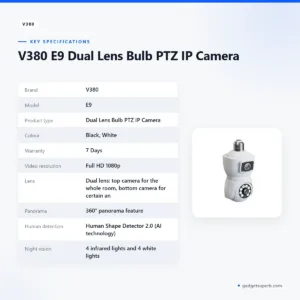
The table below sets out the specifications of the V380 IP camera as the product listing gives them, so you can compare the model name, lens design, video, sound and connection in one place. Each row uses wording taken from the listing, and where the listing gives no figure, the table gives none either.
| Brand | V380 |
| Model | E9 |
| Product type | Dual Lens Bulb PTZ IP Camera |
| Colour | Black, White |
| Warranty | 7 Days |
| Video resolution | Full HD 1080p |
| Lens | Dual lens: top camera for the whole room, bottom camera for certain angles |
| Panorama | 360° panorama feature |
| Human detection | Human Shape Detector 2.0 (AI technology) |
| Night vision | 4 infrared lights and 4 white lights |
| Audio | 2-way sound output |
| Connection | WiFi connection with built-in application |
| Lamp fitting | E27 lamp socket |
These are listed specifications from the product listing, and we have not added figures that the listing does not give.
How to use / set up
Setting up a V380 IP camera is easier when you prepare the fitting first. Make sure your lamp holder is an E27 lamp socket, as the listing requires, and check that the socket works before you fit the camera. Switch off the power at the wall before you handle the fitting, and follow the maker’s instructions for the exact sequence. Fit the camera into the socket firmly, then restore the power.
Next, connect the V380 IP camera to your WiFi network through the built-in application. Use a password you can remember, and keep your router close enough for a steady signal during setup. The listing does not describe the exact on-screen steps, so follow the maker’s instructions and keep your router name and password to hand. Once the camera is online, open the feed on your phone and check the top and bottom views.
Place the V380 IP camera where the top lens captures the room as a whole and the bottom lens covers the angle you care about most. Many homes in Dhaka have limited space and busy lighting, so take a few minutes to walk the room and see what the camera shows at different times of day. Once you are happy with the view, check the mounting so the fitting stays secure in daily use.
Care is simple. Keep the lens clean and free of dust, and check the fitting from time to time so the connection stays firm. Humidity in Bangladesh can build up in closed rooms during the monsoon, so keep the V380 IP camera in a dry place and avoid placing it near kitchens or bathrooms. Review your network settings every few months, and update your account details when you change routers or phones. The listing does not describe a maintenance schedule, so treat this as general advice.
If you plan to use more than one unit, give each camera a clear name in the application if the application allows it, and write down the room and router each one uses. Note the date you installed it as well. A short written record will help if you later need to explain a connection problem to us or to the maker, and it saves time when you move a camera to a new room.
Compatibility and what is in the box
The listing confirms three compatibility points for the V380 IP camera. It uses an E27 lamp socket, it connects over WiFi, and it works with the built-in application the listing mentions. The listing also states the colour options, black and white, which can help you match the camera to the fitting and the style of your room.
Several details about this camera are not confirmed by the listing. It does not name the phone platforms that the application supports, the router standards that work with the camera or the storage options for recordings. It also does not list other lamp fittings, so the E27 socket is the one to check. Ask us about any compatibility question before you order.
The listing includes a box list, which we have not reproduced here. When your parcel arrives, check the items against the list in the listing and ask us if anything is missing. Keep the packaging until you are satisfied with the camera’s set-up, so that any question about the V380 IP camera can be settled quickly.
Who should buy it in Bangladesh
A family that wants to check a living room or a children’s room while at work is an obvious buyer for the V380 IP camera. The Full HD 1080p recording and WiFi viewing suit that task, and two-way sound lets you speak to someone at home when you are away.
Shop owners can use the V380 IP camera to watch a counter, a stockroom or an entrance from one ceiling point. The listing mentions shops among the places where the camera can be installed, and night vision may help after closing time.
Garage and workshop owners are another group. The listing names garages and cars among possible locations, so a bulb camera in a garage may suit someone who wants a second view of a parked vehicle or of tools on a bench. A V380 IP camera in a workshop still depends on a steady WiFi signal, so test the connection where the unit will hang.
Small factory and office managers can use the V380 IP camera on a floor where many activities happen. The listing mentions factories, and Human Shape Detector 2.0 is described as detecting humans and other objects, which may help you review movement on the floor. Larger spaces may need more than one unit, so think about coverage before you buy.
Renters are a practical group too. A bulb-style unit fits an existing E27 fitting, so you may not need to change wiring, although you should check that your landlord allows the fitting to be used. If you want a camera that works with a standard E27 fitting and WiFi viewing, the V380 IP camera is designed for that purpose. If you need features the listing does not describe, such as specific storage or a different connection type, another product in our range may suit you better.
Alternatives in our store
If this camera is not the right fit, you can compare other security cameras in our range. The Meari S2 Plus 4MP Outdoor Smart PTZ WiFi Camera is another security camera from our catalogue, and the V380 WiFi Dual Lens Security Smart IP Camera is another security camera from our range. The V380 PRO E27 360 Degree 1080P Wireless Home Security IP Camera is also listed in our store, as is the Dual Lens V380 Pro PTZ Bulb IP Night Vision Camera. Browse the full range in our security cameras category.
Warranty and support
Warranty: 7 Days seller warranty.
Delivery, returns and ordering
We deliver all over Bangladesh and you pay cash on delivery, so you can order the V380 IP camera and pay when it reaches you. Delivery usually takes 1–3 days inside Dhaka city and 2–5 days outside Dhaka. Plan the timing around any date you need the camera for, especially if you are fitting it before a family visit or a shop opening.
You can return it within 7 days of delivery. Read the full steps on our Delivery and Returns policy page so you know what to do if the V380 IP camera does not suit your space. Keep the packaging and the receipt with the camera while you decide.
Questions before ordering? Call 09638054751, message us on Facebook Messenger or email care@gadgetsuperb.com. We are happy to answer questions about the listed features and the delivery timing for your area before you buy.
Frequently asked questions
Is the V380 IP camera safe to use at home?
The listing presents this camera as a way to keep your environment safe from various crimes, but it does not describe its data security settings. Use a strong password for your WiFi network and your camera account, and follow the maker’s instructions.
Can I use the V380 IP camera without WiFi?
The listing describes a WiFi connection for this camera and does not describe another way to connect it, so plan for a WiFi network first. If your home or shop has weak coverage, check the signal in the room before you fix the unit.
Why is my V380 IP camera not working?
Start by checking that the lamp socket is an E27 socket, that the fitting has power and that the camera is connected to your WiFi network. The listing does not include troubleshooting steps, so follow the maker’s instructions and contact us if the problem continues.
What is the difference between the V380 IP camera and the V380 Pro?
The listing for this camera does not compare it with other models, so we cannot list differences from the listing alone. You can read the separate listings for the V380 PRO E27 360 Degree 1080P Wireless Home Security IP Camera and the Dual Lens V380 Pro PTZ Bulb IP Night Vision Camera and compare them yourself.
Does the V380 IP camera work at night?
The listing says this camera has night vision with 4 infrared lights and 4 white lights, which allow it to record activities with minimal light. The listing does not state a viewing range, so check the night view in your own room.
Does the V380 IP camera have two-way sound?
Yes, the listing describes a 2-way sound output on this camera, which lets you interact with guests or people at home. The listing does not name the phone platforms that support the sound feature, so check the maker’s instructions.
Which socket does the V380 IP camera need?
The listing says to use an E27 lamp socket so that the camera can be installed correctly. Check the fitting type first, because the listing names that socket specifically.
How do I find my V380 IP camera password?
The listing does not explain how to find an account or device password, so follow the maker’s instructions for account setup. If you cannot recover access, contact us by phone, Facebook Messenger or email so we can point you to the right next step.
Does the V380 IP camera come with a warranty?
Yes. Warranty: 7 Days seller warranty.
Can I return the V380 IP camera if it does not suit my space?
Yes, you can return it within 7 days of delivery, following the steps in our delivery and returns policy. Read that page before you order.
Related products
-27%
45 in stock
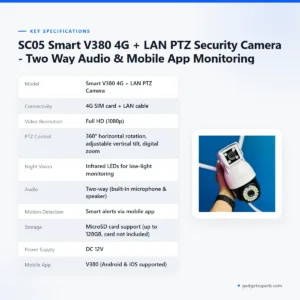

SC05 Smart V380 4G + LAN PTZ Security Camera – Two Way Audio & Mobile App Monitoring
Original price was: ৳ 4,530.৳ 3,300Current price is: ৳ 3,300.-26%
46 in stock


V380 Dual Lens Wifi IP camera
Original price was: ৳ 2,790.৳ 2,060Current price is: ৳ 2,060.-28%
32 in stock


V380 PRO 3 Lens CCTV Outdoor Waterproof Night Vision PTZ Camera (4G+LAN)
Original price was: ৳ 6,550.৳ 4,710Current price is: ৳ 4,710.-25%
451 in stock
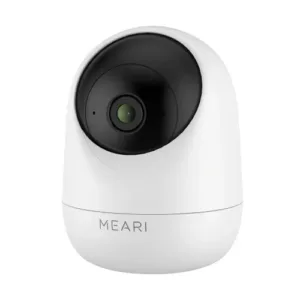
Meari S1 Plus 3MP Indoor Pan/Tilt Portable WiFi Camera
Original price was: ৳ 3,660.৳ 2,710Current price is: ৳ 2,710.-28%
47 in stock


Meari S2 Plus 4MP Outdoor Smart PTZ WiFi Camera
Original price was: ৳ 7,360.৳ 5,290Current price is: ৳ 5,290.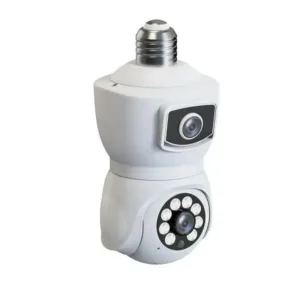 V380 E9 Dual Lens Bulb PTZ IP ...
 ৳ 2,060
Reviews
There are no reviews yet.