No products in the cart.

-23%
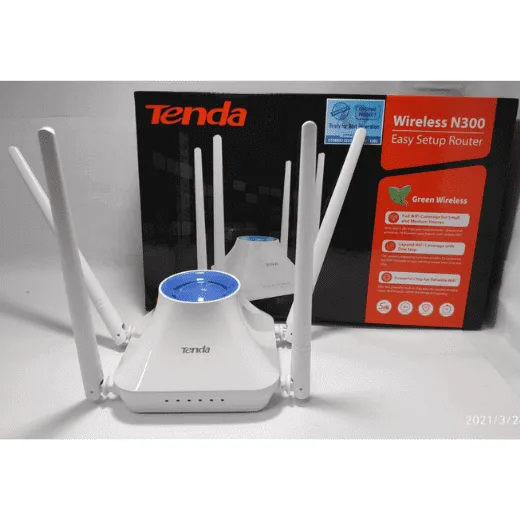
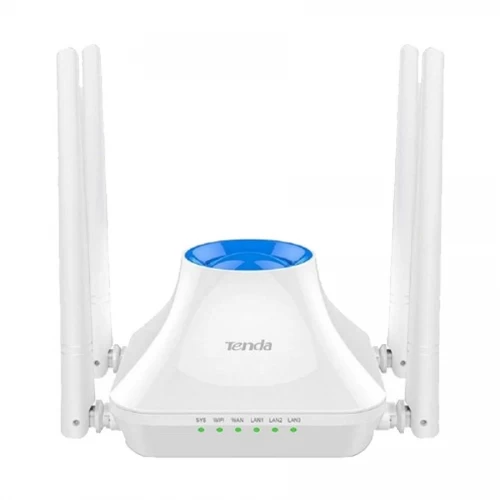



The tenda f6 router is a 300Mbps N300 wireless router with four external antennas, listed by the maker for the average home and SOHO use. It suits households and small offices in Bangladesh that want one simple Wi-Fi network for phones, tablets and computers.
- Overview of the tenda f6 router
- Key features
- Specifications
- How to use / set up
- Compatibility and what is in the box
- Who should buy it in Bangladesh
- Alternatives in our store
- Warranty and support
- Delivery, returns and ordering
- Frequently asked questions
Overview of the tenda f6 router
The tenda f6 router is listed as a 300M wireless router designed for the average home and SOHO use. According to the listing, it is compatible with all smartphones, tablets and PC, which covers the mix of devices many Bangladeshi households use: a phone for calls and messages, a tablet for lessons, and a laptop for work or study. Many families share one connection across several rooms, so that range of compatibility often matters more than any single headline figure.
A buyer comparing wireless routers should look at the band first. The listing gives a working frequency of 2.4GHz and supports the 802.11 b/g/n protocols, and it does not mention a 5GHz band. That makes the tenda f6 router a sensible starting point for everyday browsing, messaging and video calls, but it is worth listing every device that will connect before you decide.
This guide covers what the tenda f6 router is for, its listed features, the specifications from the listing, how to set it up in general terms, who should buy it, and what the listing does not confirm. Where the listing is silent, we say so rather than fill the gap. Read the specification table with the listed figures in mind, and check that your home or office layout suits a 2.4GHz router before you decide.
In Bangladesh, a router often sits in a living room, a corridor or a shared office corner where people pass it all day. Humidity in the monsoon months and dust in the dry season are common, so keep the router in a dry, ventilated spot away from direct sun and damp walls. The listing does not describe any humidity rating, so the care advice here is general rather than a claim about the product’s resistance.
Before you choose, make a short list of the devices that will connect, note the rooms that need coverage, and find where your internet line enters the home or office. Write these details down before comparing options. The listing gives the specifications for the router, but it cannot tell you how many phones your household uses, so this list is your own job and a useful one.
Key features
Four external high-gain antennas
The listing describes four external 5dBi high-gain omnidirectional antennas on the tenda f6 router. According to the listing, these spread the wireless signal to every corner of the house so the family can enjoy the network from different rooms. Bangladeshi homes often have thick brick walls, concrete floors and long flats with the router in one corner, so check the claim against your own space.
For the best result, place the router in a central, open spot, away from metal cabinets and microwave ovens. Avoid hiding it inside a cupboard or behind a television. Keep the antennas upright unless the maker’s instructions say otherwise.
300Mbps wireless transmission
The maker lists a wireless transmission rate of up to 300Mbps for the tenda f6 router, based on 11N wireless standards. According to the listing, this makes networking more efficient. Real speed in your home depends on the number of devices, distance from the router, walls and your internet plan, and the listing does not cover those factors.
Treat the listed rate as the wireless ceiling, not a promise for every download. For everyday browsing, messaging and social media, the listed rate is the number to note. If several people stream video at once, they will share the same wireless link, so plan the household’s usage before you buy.
Easy setup and built-in guidance
The listing says the router is easy to install using the latest technology, with a more concise interface optimisation, networking, embedded intelligent diagnostic functions, and a real-time guide for the user to install and set up. Those are the maker’s words, and this page does not add detail beyond them.
Follow the maker’s instructions and the guidance shown during installation. Have your internet connection details to hand before you begin, because your provider’s settings will be needed. Connect the power adapter to a suitable socket, wait for the router to start, and then connect your phone or computer to the network it shows.
Wide device compatibility
The listing says the tenda f6 router is compatible with systems running Windows 7 or later versions, Linux, iOS 6 or higher, and Android 6 or later builds. It also describes compatibility with all smartphones, tablets and PC. For families and small offices in Dhaka, Chattogram, Sylhet and other cities, that is a broad mix of common phones and laptops, though older devices should be checked against the listed versions.
If you run an unusual operating system or a very old device, ask us first. This matters most for a shared household network, where the router will serve every family member’s gadgets at the same time.
Wireless encryption and security
The listing gives WPA / WPA2 mixed advanced wireless encryption for the tenda f6 router. Set a strong, unique password for your wireless network, and share it only with people in your home or office. Change the password if a device you no longer use had access.
The listing does not describe other security features, so do not assume more than the encryption it names. If you run a small office, agree password rules with your staff and keep a record of who holds the password. Keep a written copy of the network name and password in a safe place.
Dimensions and weight
The listing gives dimensions of 127.4mm * 90.5mm * 26mm and a weight of 200 g for the tenda f6 router, which is listed in white. Those figures help you plan shelf or desk space before delivery. Measure your spot, including room for the cables and the power adapter, before you decide where the router will sit.
The listing does not describe mounting options, so plan a flat, stable surface unless the maker’s instructions say otherwise. Leave a little space at the back for the cables, so they are not pulled tight when the router is moved.
Specifications
The table below sets out the specifications for the tenda f6 router, taken from the product listing. Check each row against your needs.
| Data Rate | 300Mbps |
| Antenna | 4 antenna |
| Buttons | 1*RESET button 1*WIFI button |
| Frequency | 2.4GHz |
| Wireless standards | 802.11 b/g/n |
| Wireless | Yes |
| Encryption | WPA / WPA2 mixed Advanced wireless encryption |
| Ports | 3 LAN port |
| Operating System Support | Windows 7 or later versions, Linux, iOS 6 or higher, and Android 6 or later builds |
| Power Input | 100-240V-50 / 60Hz 0.3A |
| Power Output | DC 9V == 0.6A |
| Dimensions | 127.4mm * 90.5mm * 26mm |
| Weight | 200 g |
| Color | White |
These are listed specifications from the product listing.
How to use / set up
Setting up the tenda f6 router should be straightforward if you follow the maker’s instructions. The listing mentions a real-time guide for installation, so keep it open while you work through the steps. The steps below are general, because the listing does not describe the exact sequence.
The listing names one RESET button and one WIFI button. Check the maker’s instructions for what each button does before you press either one. Check the listed power input of 100-240V-50 / 60Hz 0.3A before you plug in, and use a stable outlet.
- Place the router in a central, open spot and connect the power adapter.
- Connect your internet line as the maker’s instructions describe.
- Connect a phone, tablet or computer to the wireless network the router shows.
- Follow the guide the maker provides to set the network name and password.
- Check that each device can open a web page before you move the router.
Once the router is working, keep the setup details with your delivery note so you can find them later if a device needs reconnecting. Mark the spot where the router sits, so a later move does not break the connection for your household.
Power cuts, or load-shedding, are part of life in many parts of Bangladesh. The listing does not mention battery backup or any uninterruptible power supply, so if you rely on the network during outages, plan your own power protection. Keep the router on a stable outlet, and switch off the socket after long outages to protect the adapter.
Care and storage: dust builds up on vents and casings over time. Wipe the outside of the tenda f6 router with a dry, soft cloth when the room is dusty, and never spray liquid directly onto it.
Keep cables loose rather than tightly bent or pinched behind furniture, and leave some space around the router so air can move. Avoid stacking other electronics directly on top of it. If you pack the router away, keep the adapter and cables together in a dry box.
If you move house, reconnect the router at the new spot, check the connection in each room you use, and confirm that your devices still see the network before you rely on it. Keep the router out of reach of small children and pets when it sits on the floor.
After the first setup, use each device for a few minutes in the rooms where it will be used most. Note any room where the connection drops, and move the router only as far as your home layout allows. Small changes in position are often the simplest step before you change anything else.
Compatibility and what is in the box
The listing names compatibility with systems running Windows 7 or later versions, Linux, iOS 6 or higher, and Android 6 or later builds. It also lists compatibility with all smartphones, tablets and PC. These are the listed compatibility points for the tenda f6 router.
The listing does not confirm what the box contains, so check the contents on delivery. If you need a list before you order, ask us. Anything not named in the listing should be treated as unconfirmed until you see it. For the maker’s own product information, you can also read the maker’s website.
For a home network, check that the phones, tablets and computers you plan to connect run one of the listed systems. For a small office, list each staff device and its operating system, then compare them with the listed versions. Keep a short note of any device that falls outside the list, so you can check it first.
When you check a device, use the version it reports about itself rather than a guess. Older phones and laptops that have not received system updates may sit at the edge of the listed versions, so note the exact version before you commit to a plan for a whole household or office.
Who should buy it in Bangladesh
A family in a flat in Dhaka who wants one wireless network for phones, tablets and a laptop may find the tenda f6 router a practical fit, provided it can sit near the middle of the home. The four listed antennas are there to help the signal reach more rooms, but the layout of your flat still matters.
A freelancer or remote worker using a small room at home can use the tenda f6 router for one laptop and a phone during video calls. The listed 300Mbps rate is a reasonable reference for everyday work tasks, while heavy file transfers will depend on your internet plan and the distance to the router.
A small shop, consultancy or SOHO office with a few staff can use the router for basic internet access. Agree on password rules, keep a record of the network details, and confirm that each staff device runs one of the listed operating systems.
Students living in a hostel or shared flat may consider the tenda f6 router for a fixed home connection. Discuss the setup with the flat owner or family first, because the router will need a power outlet and a stable spot. Agree in advance who keeps the password and who handles any reconnecting.
A household in a small town with a fixed internet line and one main living room may find the router easy to place near the main socket. Ask your internet provider about the line type first, since the listing does not cover it.
A home office where two people share one desk may find the router useful for a simple shared network, provided both devices run a listed operating system. Keep the desk tidy around the cables so nobody trips over the adapter.
A household where children attend online classes on a tablet and a phone may want a single network that covers the main rooms. Plan the study times with the family, because the listed rate is shared by every device that is connected at the same moment.
Buyers who need a separate 5GHz network, or a pocket router for travel, should look elsewhere. The listing gives a 2.4GHz frequency only, so compare the options in the next section before deciding on the tenda f6 router.
Alternatives in our store
If the tenda f6 router does not match your plan, browse these options in our range. For another router in our range, see the Cudy WR1200 AC1200 Dual Band Smart Wi-Fi Router. For a portable option from our pocket WiFi range, see the Vemo E5783 Plus 4G/5G Portable Pocket WiFi Router – 300Mbps High-Speed Mobile Hotspot with 3000mAh Battery.
Another router in our range is the Ruijie RG-EW1300G 1300M Dual-Band Gigabit WiFi Router. For a networking accessory, see the Metal Router Stand – Black. You can browse the full Routers & Pocket WiFi category to compare all options with the tenda f6 router.
Warranty and support
Warranty: 7 Days seller warranty.
Delivery, returns and ordering
Ordering the tenda f6 router is straightforward. We deliver all over Bangladesh and you pay cash on delivery. Delivery usually takes 1–3 days inside Dhaka city and 2–5 days outside Dhaka.
You can return it within 7 days of delivery (see our Delivery & Returns policy). Read the full policy before you choose the tenda f6 router, so you know the steps for returns and the delivery windows for your area.
Questions before ordering: call 09638054751, message us on Facebook Messenger or email care@gadgetsuperb.com. Our team can answer questions about fit, compatibility and the listed specifications before you place your order.
If you are ordering the tenda f6 router for a family member or an office, give the recipient’s name, a working phone number and a clear delivery address. A complete address reduces the chance of a delay on the way.
Cash on delivery means you pay when the parcel arrives, so have payment ready and check that the parcel is intact before you accept it. Keep the delivery note, as it helps if you later need to contact us about the order.
Orders outside Dhaka take a little longer, so plan the date you need the router. If you are setting up a shared network for a family or an office, schedule the installation for a day when someone can be present to check each device.
Frequently asked questions
Is the tenda f6 router a dual band router?
No. The listing gives a 2.4GHz frequency and supports 802.11 b/g/n, and it does not mention a 5GHz band.
What is the wireless speed of the tenda f6 router?
The tenda f6 router is listed at up to 300Mbps, based on 11N wireless standards. Real speed depends on distance, walls and the number of devices.
How many antennas does the tenda f6 router have?
According to the listing, the tenda f6 router has four external 5dBi high-gain omnidirectional antennas.
Does the tenda f6 router work with Android and iOS devices?
Yes, according to the listing. It supports Android 6 or later builds and iOS 6 or higher, and it is listed as compatible with all smartphones, tablets and PC.
How many LAN ports does the tenda f6 router have?
The listing gives 3 LAN ports.
Which wireless encryption does the tenda f6 router use?
The listing gives WPA / WPA2 mixed advanced wireless encryption.
What is the warranty on the tenda f6 router?
Warranty: 7 Days seller warranty. Ask us before ordering if you need more detail.
Can I return the tenda f6 router?
Yes. You can return it within 7 days of delivery, as set out in our Delivery & Returns policy.
Do you deliver the tenda f6 router outside Dhaka?
Yes. We deliver all over Bangladesh and you pay cash on delivery. Delivery usually takes 2–5 days outside Dhaka.
Is the tenda f6 router suitable for a small office?
The listing says it is designed for the average home and SOHO use, so confirm your needs before you order.
How long does delivery take for the tenda f6 router?
Delivery usually takes 1–3 days inside Dhaka city and 2–5 days outside Dhaka. Ask us if you need the router by a set date.
How do I contact Gadget Superb about the tenda f6 router?
Call 09638054751, message us on Facebook Messenger or email care@gadgetsuperb.com.
Related products
-25%
50 in stock
Hoco DQ12 Portable WiFi Router
Original price was: ৳ 3,740.৳ 2,770Current price is: ৳ 2,770.
-27%
30 in stock
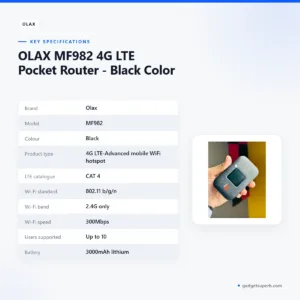

OLAX MF982 4G LTE Pocket Router – Black Color
Original price was: ৳ 4,200.৳ 3,060Current price is: ৳ 3,060.-27%
22 in stock
PW100 4G LTE Pocket Wi-Fi Router with 10000mAh Bettery – 300Mbps
Original price was: ৳ 5,440.৳ 3,970Current price is: ৳ 3,970.-23%
40 in stock
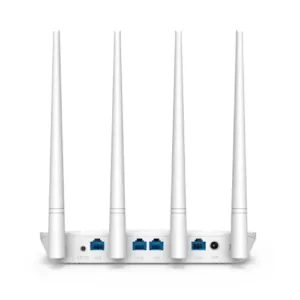
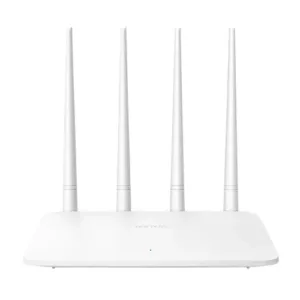
Tenda F6 300Mbps WiFi Router
Original price was: ৳ 2,100.৳ 1,610Current price is: ৳ 1,610.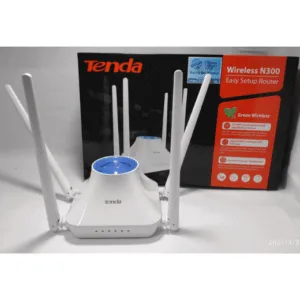 Tenda F6 300Mbps N300 4 Antenn...
Original price was: ৳ 2,180.৳ 1,670Current price is: ৳ 1,670.
284 in stock
Reviews
There are no reviews yet.