No products in the cart.

-27%
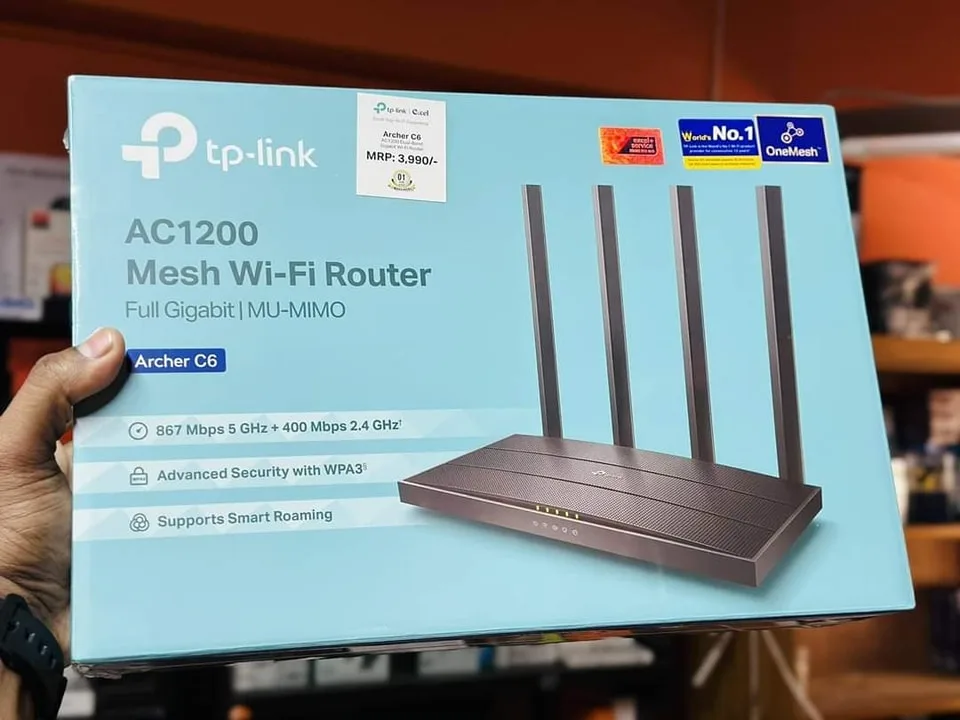
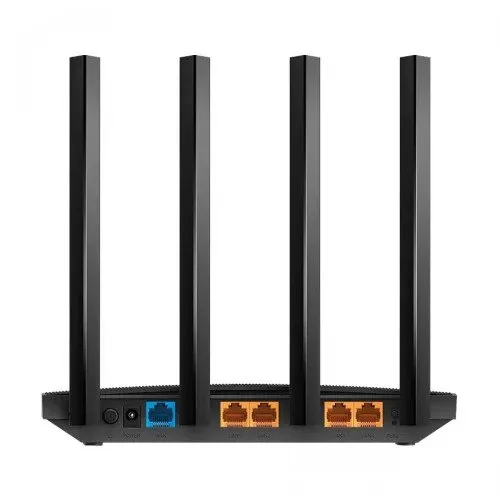


The tp-link c6 router is listed by the maker as the TP-Link Archer C6 Gigabit Dual-Band Wi-Fi Router, model C6. It suits Bangladeshi homes and small offices that want one box for wireless devices and wired computers, with a Micro SIM slot for mobile data when needed.
- What the tp-link c6 router is
- Key features
- Specifications
- How to use and set up
- Compatibility and what is in the box
- Who should buy it in Bangladesh
- Alternatives in our store
- Warranty and support
- Delivery, returns and ordering
- Frequently asked questions
What the tp-link c6 router is
The tp-link c6 router is a Wi-Fi router listed in our Routers and Pocket WiFi range under the name TP-Link Archer C6 Gigabit Dual-Band Wi-Fi Router, with the model C6. The brand is TP-Link and the listed model name is Archer C6. Because the store files it under routers, you can compare it directly with other products in that category before you choose.
For many buyers in Bangladesh, the real question is whether a home router will serve the whole household, or whether a pocket device is the better choice. The tp-link c6 router lists three 10/100Mbps LAN ports and one 10/100Mbps LAN/WAN port. A desktop, a television or a game console can connect by cable, while phones and laptops join over Wi-Fi. One box can therefore cover a flat, a shop counter or a small office desk.
Load-shedding and humidity are part of daily life in many parts of Bangladesh, so the operating conditions matter. According to the listing, the tp-link c6 router works at 0℃~40℃ (32℉ ~104℉) with 10%~90% non-condensing humidity. Keep it in a ventilated place, out of direct sun and away from damp walls. The listing does not describe how the router behaves during a power cut, so plan your own power arrangements. Before you order, confirm your model: the product name says Gigabit and Dual-Band, but the listed frequency is 2.4 GHz and the listed port speeds are 10/100Mbps.
Key features
The listing groups its details under signal, wireless, interface, power and dimensions. The sections below follow those headings, so you can check each point against the specification table. Each heading names a feature the listing mentions for the tp-link c6 router.
Signal rate of 300 Mbps at 2.4 GHz
The listing gives the signal rate of the tp-link c6 router as 300 Mbps at 2.4 GHz. The frequency is listed as 2.4 GHz, and the wireless standards are IEEE 802.11b, 802.11g and 802.11n. The listing does not give real-world results, so the speed you see will depend on your internet plan, the distance from the router, walls and the number of devices in use. Treat the figure as the maker’s starting point rather than a promise for your home. After setup, you can run a speed check on one device and write the result in a notebook, so you can compare it later.
Two detachable external 4G LTE antennas
According to the listing, the tp-link c6 router has two detachable external 4G LTE antennas. Its 4G network standard is listed as FDD-LTE Cat4 (800/900/1800/2100/2600MHz) and TDD-LTE (1900/2300/2500/2600MHz), while 3G is listed as DC-HSPA+, HSPA+, HSPA and UMTS (900/2100MHz). Support on a specific Bangladeshi mobile network is not confirmed by the listing, so check your operator’s supported bands with them. Follow the maker’s instructions when you attach or remove the antennas, and keep the connectors clean and dry.
Wireless security and wireless controls
The listing gives wireless security for the tp-link c6 router as 64/128-bit WEP, WPA/WPA2 and WPA-PSK/WPA2-PSK encryptions. It also lists options to enable or disable the wireless radio, a wireless schedule, WMM and wireless statistics. Choose the strongest encryption your devices support, and use a passphrase that is long and unique to your home. The listing does not say which encryption is set by default, so review the settings after setup. Keep a copy of your passphrase somewhere safe, because you will need it when a new phone or laptop joins the network.
Ports and Micro SIM card slot
The listing shows three 10/100Mbps LAN ports and one 10/100Mbps LAN/WAN port on the tp-link c6 router, along with a Micro SIM card slot. The product name includes the word Gigabit, but every port speed in the listing is 10/100Mbps, so plan your cable runs with that in mind. Follow the maker’s instructions to decide which port connects to your internet line. Insert a micro SIM only when you need mobile data, and keep the slot clean and dry when it is empty.
Power, dimensions and operating conditions
The listing gives the power source as an external power supply of 12V/1A, and transmit power for CE as less than 20 dBm at 2.4 GHz. The dimensions are listed as 7.95 × 5.55 × 1.32 in. (202 × 141 × 33.6 mm), and the colour is Black. Storage temperature is listed as -40℃~70℃ (-40℉ ~158℉), with storage humidity of 5%~90% non-condensing. Keep the power adapter on a stable socket, and keep the tp-link c6 router clear of heat sources and direct sun in your room. Measure your shelf before you buy, so the router fits with its cables in place.
Specifications
The table below sets out the tp-link c6 router specifications as they appear in the listing for this model.
| Specification | Listed value |
|---|---|
| Brand | TP-Link |
| Model | Archer C6 |
| Signal rate | 300 Mbps at 2.4 GHz |
| Frequency | 2.4 GHz |
| Antenna | 2 × Detachable External 4G LTE Antennas |
| Wireless standards | IEEE 802.11b, 802.11g, 802.11n |
| Wireless security | 64/128-bit WEP, WPA/WPA2, WPA-PSK/WPA2-PSK encryptions |
| Ports | 3 × 10/100Mbps LAN ports; 1 × 10/100Mbps LAN/WAN port |
| SIM slot | 1 × Micro SIM card slot |
| Network standard | 4G: FDD-LTE Cat4 (800/900/1800/2100/2600MHz), TDD-LTE (1900/2300/2500/2600MHz); 3G: DC-HSPA+/HSPA+/HSPA/UMTS (900/2100MHz) |
| Power source | External power supply 12V/1A |
| Dimensions | 7.95 × 5.55 × 1.32 in. (202 × 141 × 33.6 mm) |
| Colour | Black |
| Warranty | 01 year of warranty |
These are listed specifications from the product listing.
How to use and set up
The steps below are general. Follow the maker’s instructions for the exact settings on your model. For the maker’s own product information, see the maker’s website.
Start by choosing a place. Pick a ventilated spot within the listed operating temperature range, away from direct sun and damp walls. Next, connect the external power supply rated 12V/1A and plug the adapter into a stable socket. If you need mobile data, insert the micro SIM into the slot and attach the detachable external antennas, following the maker’s instructions for the tp-link c6 router.
Connect your internet line to the port the maker’s instructions describe, then join your computer or phone to the router by Wi-Fi or cable. Set a wireless name and a strong passphrase, and choose one of the listed encryptions. If you are asked to change a default administrator password, do so and keep a written note of your settings somewhere safe. Check the connection on one device before you place the router in its final spot.
Care for the router is simple. Dust the vents with a dry, soft brush, keep the area around it free of clutter, and avoid stacking items on top of it. Wipe the casing with a dry cloth and keep wet cleaners away from the ports. After you move furniture, check that every cable is seated firmly, because a loose plug can look like a fault.
Power interruptions can happen in many parts of the country, so check the connection after each outage and make sure the adapter is seated firmly. The listing does not describe how the router restarts after a power cut, so do not assume it will reconnect by itself. If you rely on the router during long outages, talk to your electricity supplier about your options and keep the adapter in a known place.
If you store the router for a while, keep it within the listed storage temperature of -40℃~70℃ (-40℉ ~158℉) and storage humidity of 5%~90% non-condensing. Keep it away from direct sun and damp, and avoid a closed cupboard with no airflow. Before you put it away, note the wireless name, the passphrase and any settings you changed, so setup is quick when you take it out again.
Compatibility and what is in the box
The listing names these operating systems for the tp-link c6 router: Microsoft Windows 98SE, NT, 2000, XP, Vista or Windows 7, 8, 8.1, MAC OS, NetWare, UNIX or Linux. It also lists the browsers Internet Explorer 11, Firefox 12.0, Chrome 20.0, Safari 4.0 browsers or higher, or other Java-enabled browsers. These are the items the listing confirms, and the wording follows the maker’s listing.
The listing names a Micro SIM card for the 4G function, and it lists the 4G and 3G network standards shown above. Compatibility with a particular mobile operator, phone or internet provider is not confirmed by the listing, so ask us before ordering if your setup is unusual.
The listing does not give package contents, so this page does not list what comes in the box. Ask us before you order if you need that detail, using the contact details in the delivery section below.
Who should buy it in Bangladesh
A family flat in Dhaka with several phones, laptops and a desktop is a natural fit for the tp-link c6 router, especially if you want Wi-Fi across the rooms of a home. The three LAN ports and one LAN/WAN port let a desktop and a television or game console connect by cable, with everything else on Wi-Fi.
A home office or a small shop counter with a few computers, a card reader and a printer could also use the tp-link c6 router, provided the listed port speeds and wireless coverage meet your needs. The listing does not give range figures, so check coverage in the actual room after setup, not only on paper.
A buyer who needs mobile internet in a place without a fixed line might look at the Micro SIM slot and 4G LTE antennas. The listing shows the slot and the standards, but it does not confirm support on any Bangladeshi network, so check your operator’s bands before you rely on mobile data.
Someone who wants gigabit wired speeds should not choose this model on the strength of its name alone. The listed port speeds are 10/100Mbps, so compare the port rows with the alternatives below before you decide.
A tenant who may move house later can take the router along, provided the adapter and cables travel with it. Check the power supply rating and the dimensions before you pack it, so the shelf in the new home is ready when you arrive.
Students and home tutors who run online classes from one room can use the tp-link c6 router for a steady wireless connection. The listing does not describe performance for video calls, so test your own connection in that room before you rely on it for lessons.
Someone buying for an elderly parent or a relative in another district should think about who will do the setup. Ask us about delivery timing and returns before ordering, and note the phone number you want the courier to call.
Alternatives in our store
If you are still comparing the tp-link c6 router, look at Cudy WR1200 AC1200 Dual Band Smart Wi-Fi Router, which is another Wi-Fi router in our range. For a mobile option, see Vemo E5783 Plus 4G/5G Portable Pocket WiFi Router – 300Mbps High-Speed Mobile Hotspot with 3000mAh Battery, which is another pocket WiFi router in our range.
Another Wi-Fi router to consider is Ruijie RG-EW1300G 1300M Dual-Band Gigabit WiFi Router. For a desk accessory, see Metal Router Stand – Black, which is a router stand in our range. You can browse the full category at Routers and Pocket WiFi.
Compare the specification table on each product page with the tp-link c6 router before you choose. Match the port rows, the wireless standards and the power supply to the room where the router will sit.
Warranty and support
Warranty: 1 Year seller warranty.
Delivery, returns and ordering
We deliver all over Bangladesh and you pay cash on delivery. Delivery usually takes 1–3 days inside Dhaka city and 2–5 days outside Dhaka, so have your delivery details ready when you order.
You can return it within 7 days of delivery. See our Delivery and Returns policy for the full terms before you order the tp-link c6 router.
Questions before ordering: call 09638054751, message us on Facebook Messenger or email care@gadgetsuperb.com. Ask about the tp-link c6 router, the delivery area or the return steps before you agree to the order.
When you order, check your delivery address and phone number so the courier can reach you. If you are buying for someone else, share the order details with them in advance, so they know when the parcel is coming. Keep the packaging until you have checked the contents against your order.
Frequently asked questions
What is the tp-link c6 router?
The tp-link c6 router is the TP-Link Archer C6 Gigabit Dual-Band Wi-Fi Router, model C6, listed in our Routers and Pocket WiFi category. The listing gives a signal rate of 300 Mbps at 2.4 GHz and a Micro SIM card slot.
Is the tp-link c6 router dual-band?
The product name says dual-band, but the listed frequency is 2.4 GHz only. Check this with us before you order, because the listing does not show a second frequency band.
What speed does the tp-link c6 router list?
The listing gives a signal rate of 300 Mbps at 2.4 GHz. Real speed depends on your internet plan, distance and walls, and the listing does not give real-world results.
Can I use a SIM card with the tp-link c6 router?
Yes, the listing shows a Micro SIM card slot and 4G LTE and 3G network standards. The listing does not confirm support on a specific Bangladeshi mobile network, so ask us first.
Does the tp-link c6 router need a power adapter?
Yes, the listing gives an external power supply of 12V/1A. Keep the adapter on a stable socket and follow the maker’s instructions.
How long is the warranty on the tp-link c6 router?
The product page lists 1 Year seller warranty, and the listing gives the manufacturer warranty as 01 year.
Which wireless security options does the tp-link c6 router list?
The listing gives 64/128-bit WEP, WPA/WPA2 and WPA-PSK/WPA2-PSK encryptions. Choose the strongest option your devices support.
How many LAN ports does the tp-link c6 router have?
The listing shows three 10/100Mbps LAN ports and one 10/100Mbps LAN/WAN port. Plan your cables around those ports, since every listed port speed is 10/100Mbps.
Can I pay cash on delivery for the tp-link c6 router?
Yes, we deliver all over Bangladesh and you pay cash on delivery.
How long does delivery of the tp-link c6 router take?
Delivery usually takes 1–3 days inside Dhaka city and 2–5 days outside Dhaka.
Can I return the tp-link c6 router?
You can return it within 7 days of delivery. The Delivery and Returns policy page has the full details.
Who can I ask before ordering the tp-link c6 router?
Call 09638054751, message us on Facebook Messenger or email care@gadgetsuperb.com before you order.
Related products
-23%
66 in stock

Vsol V2801SG XPON (G/Epon) Single Port ONU
Original price was: ৳ 1,930.৳ 1,480Current price is: ৳ 1,480.
-23%
50 in stock
Ruijie RG-EW300N 300 Mbps Wi-Fi 4 Wireless Smart Router
Original price was: ৳ 2,470.৳ 1,900Current price is: ৳ 1,900.-27%
22 in stock
PW100 4G LTE Pocket Wi-Fi Router with 10000mAh Bettery – 300Mbps
Original price was: ৳ 5,440.৳ 3,970Current price is: ৳ 3,970.-23%
284 in stock
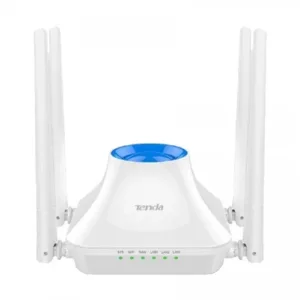
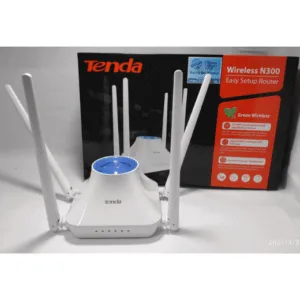
Tenda F6 300Mbps N300 4 Antenna Wifi Router
Original price was: ৳ 2,180.৳ 1,670Current price is: ৳ 1,670.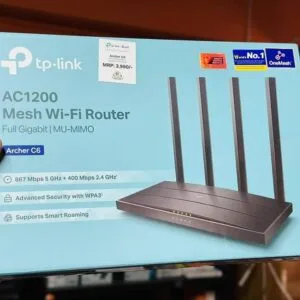 TP-Link Archer C6 Gigabit Dual...
Original price was: ৳ 5,390.৳ 3,930Current price is: ৳ 3,930.
23 in stock
Reviews
There are no reviews yet.